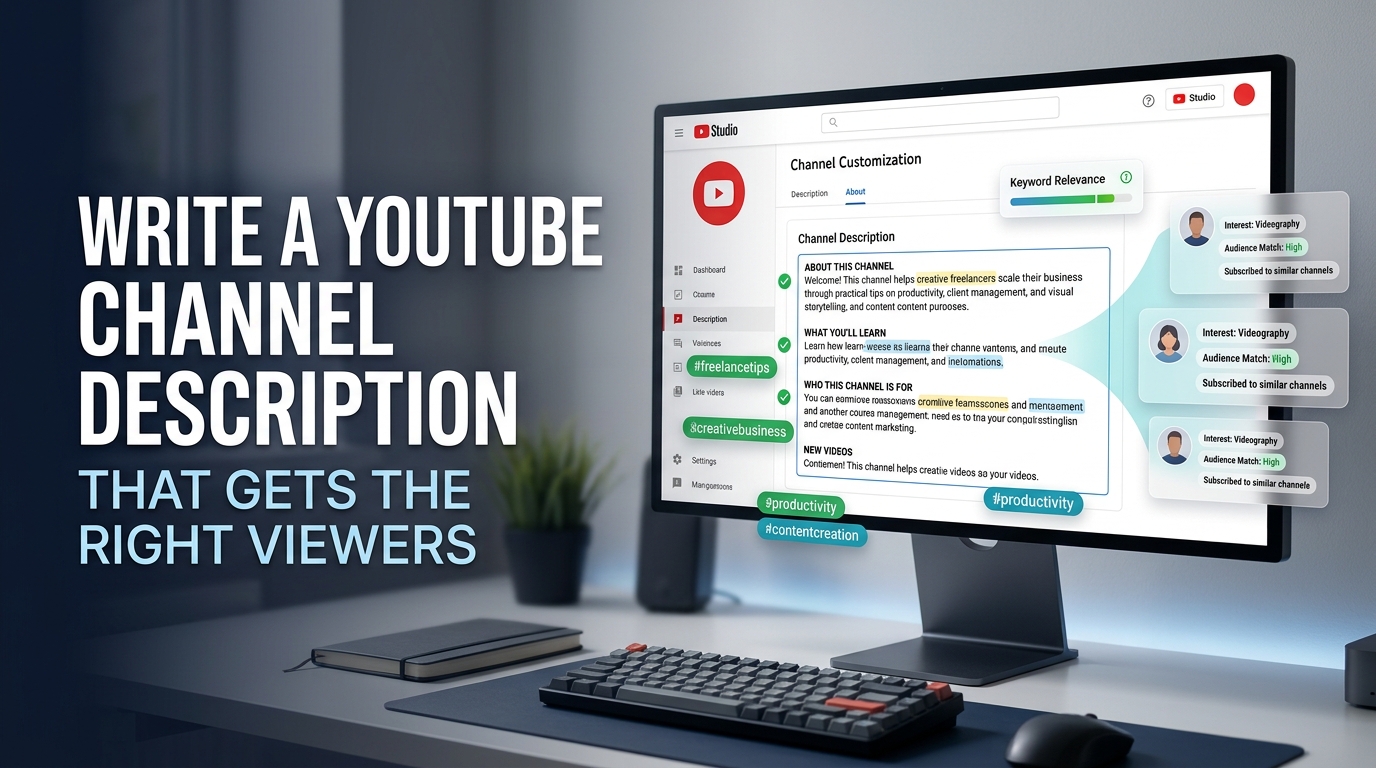
A strong YouTube channel description tells a new visitor who the channel helps, what content they will find, why they should trust the creator, and what to do next. The most useful format is short enough to scan but specific enough to distinguish the channel from dozens of similar options.
Use this formula:
Audience + promise + content pillars + proof or point of view + next step
For example: “For beginner home cooks, this channel shares 10-minute recipes, meal-prep systems, and knife-skills tutorials. I test each recipe in a small kitchen and explain the decisions behind every step. Subscribe for a new practical recipe every Friday.”
That example works because it identifies the viewer, names the value, describes recurring topics, adds a credible point of view, and finishes with one clear action. This guide shows you how to build that structure, optimize it without keyword stuffing, add profile links, and write descriptions for different niches.
Conceptual editorial image. The interface shown does not reproduce a real creator account.
What should a YouTube channel description include?
Your channel description should answer five questions in a logical order:
Question | What to write | Example |
Who is this for? | A specific audience or problem | “For first-time apartment gardeners” |
What will viewers get? | The result or experience you provide | “Learn how to grow food in small spaces” |
What topics do you cover? | Two to five recurring content pillars | “Containers, herbs, indoor lights, and balcony layouts” |
Why should viewers trust you? | Experience, method, perspective, or proof | “I test each setup in a rented apartment” |
What should they do next? | One primary action | “Subscribe for a new small-space gardening guide every week” |
You do not need to answer each question with a separate sentence. Combine them into a compact paragraph that sounds like a person explaining the channel to a friend.
What is the best YouTube channel description formula?
A practical formula is:
Plain Text
For [specific audience], [channel name] helps you [clear result]. Expect [content pillar 1], [content pillar 2], and [content pillar 3]. [Proof, experience, or point of view]. [Upload rhythm or primary call to action].
Fill it in before you polish the wording:
Plain Text
For ____________________, this channel helps you ____________________. Expect ____________________, ____________________, and ____________________. I/we ____________________, so you can trust ____________________. Subscribe/watch/download ____________________.
The formula prevents a common problem: describing the creator without explaining the viewer’s benefit. “I love cameras and started this channel in 2019” may be true, but “Learn how to choose and use cameras for solo filmmaking” gives a new visitor a reason to stay.
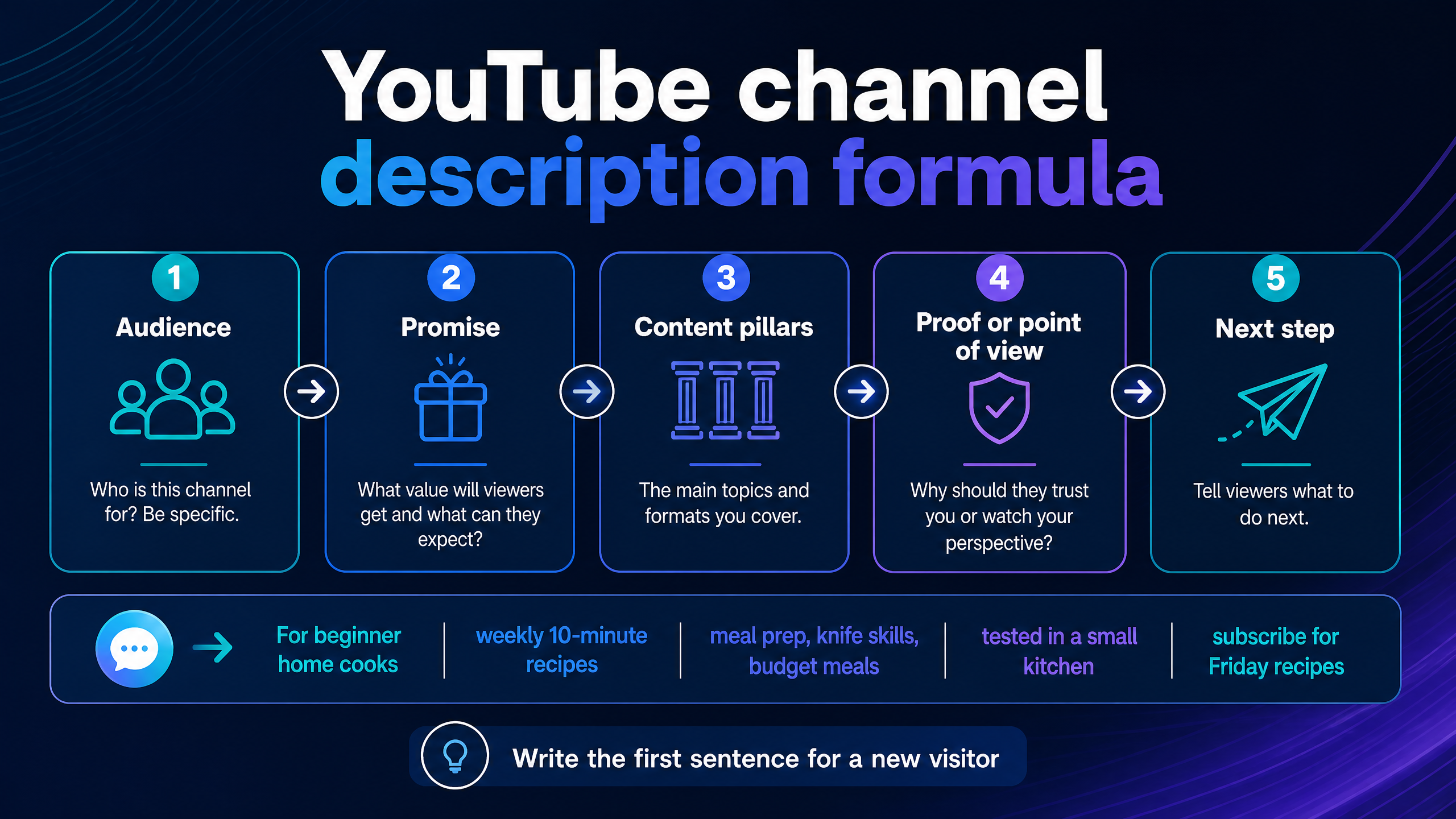
Use the formula as a planning tool, then rewrite it so the final description sounds natural.
How long should a YouTube channel description be?
YouTube’s official profile documentation identifies the channel description as a profile field but does not state a character limit in the help text reviewed for this guide. Public creator references commonly report a 1,000-character limit for the channel About description. Because YouTube can change fields and limits, check the live description box in YouTube Studio before publishing.
A practical target is 300 to 700 characters for most channels. That gives you room to explain the channel without turning the About section into a keyword list. Use the remaining space only when the extra information helps a visitor decide whether to subscribe.
Do not confuse the channel description with a video description. YouTube’s official video-description guidance documents a separate maximum of 5,000 characters for individual videos.
What should the first sentence of a channel description say?
The first sentence should tell a new visitor what the channel offers and who it serves. Do not spend the opening on a greeting, origin story, or vague promise.
Weak opening:
Welcome to my channel. I hope you enjoy the videos.
Stronger opening:
Learn practical video-editing techniques for YouTube, from clean cuts and captions to faster export settings.
The stronger version gives the visitor a topic, audience context, and useful outcome immediately. It also creates a natural place for one primary keyword without forcing the phrase into every line.
Use this first-sentence test: if a stranger reads only the opening line, will they know whether the channel is relevant to them? If not, rewrite it before working on the rest.
How do you write a unique description for a YouTube channel?
Start with the channel’s specific point of difference, not a list of broad category words. “Fitness, motivation, and lifestyle” could describe thousands of channels. “Three-day strength plans for busy beginners who train at home” gives the visitor a clearer reason to choose you.
Find uniqueness in one of five places:
Differentiator | Question to answer | Example |
Audience | Who do you serve more specifically than competitors? | “For teachers with limited prep time” |
Method | How do you approach the topic? | “Every tutorial uses free software” |
Format | What recurring experience do viewers get? | “One 20-minute project each Tuesday” |
Point of view | What do you believe or evaluate? | “Honest reviews after 30 days of use” |
Constraint | What real-world limitation do you solve? | “Budget travel with one carry-on” |
Choose one or two differentiators and support them with concrete content examples. You do not need to claim that the channel is the best, biggest, or only option.
How do you add keywords to a YouTube channel description?
Use the words your target viewer would naturally use when describing the channel’s topic. Place the primary topic in the first sentence, then mention related content pillars once where they fit the meaning.
For a channel about beginner photography, natural wording could include “camera settings,” “portrait lighting,” “phone photography,” and “editing basics.” Do not repeat “best photography YouTube channel” five times. Keyword repetition makes the description harder to read and does not replace strong videos, accurate titles, clear thumbnails, or audience satisfaction.
YouTube for Creators recommends getting to the point quickly, using important keywords early in titles, and using analytics to understand what viewers search for and watch. Apply the same reader-first principle to your channel description: make the topic clear, then use Analytics to refine the language based on the audience you want to reach.
How many keywords should a channel description contain?
Use enough related terms to explain the channel, not enough to create a keyword inventory. Most descriptions need one primary topic and two to five supporting topics.
A useful rule is one topic phrase per meaningful sentence. If a keyword does not help the visitor understand the channel, remove it.
How do you write a YouTube channel description for SEO?
Write for search clarity rather than search manipulation. Name the audience, outcome, and recurring topics in ordinary language. Then make sure your videos, titles, thumbnails, and upload patterns support the promise in the description.
A channel description cannot compensate for videos that do not match the stated topic. If your About section promises beginner Excel tutorials but your latest uploads focus on gaming news, a new visitor receives mixed signals.
Use this SEO workflow:
1.Write the one-sentence channel promise.
2.List the three topics you cover most often.
3.Choose the primary phrase a target viewer might search.
4.Add two or three related phrases naturally.
5.Remove repeated words and broad claims.
6.Read the description aloud and edit for clarity.
7.Compare the description with your recent uploads and channel banner.
YouTube says its search and discovery systems aim to connect each viewer with videos they are likely to watch and enjoy. It recommends focusing on what your audience likes and using Analytics to understand that audience. Treat the description as a positioning statement, not a ranking shortcut.
How do you add a YouTube channel description in Studio?
YouTube’s current computer help flow is:
1.Sign in to YouTube Studio.
2.Open Customization from the left menu.
3.Select Profile.
4.Enter or edit the channel description.
5.Review your channel links and contact information.
6.Publish the changes.
The same profile area can include your channel name, handle, translations, channel URL, profile links, and contact information.
Open the public channel page after publishing. Check the description as a visitor would see it, especially on mobile. Look for awkward line breaks, a buried first sentence, broken links, or a CTA that points to an outdated page.
Can you add links to a YouTube channel description?
YouTube’s link guidance distinguishes between channel profile links and URLs placed in other surfaces. Creators can showcase up to 14 links on the channel page through profile links.
Use profile links for your main website, newsletter, store, booking page, community, or most important social platform. Do not paste a long list of links into the description when a smaller set of organized profile links can do the job.
YouTube says some external links require advanced-features access to become clickable, and external destinations must follow its External links policy. Check the live link behavior after publishing rather than assuming every URL works in every surface.
How many links should a YouTube channel description include?
Use one primary CTA and a small number of supporting destinations. Five well-organized links usually communicate more clearly than fifteen competing instructions.
Put the most valuable link first in the profile-link area. Label it by outcome, such as “Get the free editing checklist,” “Book a consultation,” or “Browse the gear list,” instead of using generic labels such as “Click here.”
What is the difference between a channel description and a video description?
A channel description explains the channel as a whole. A video description explains one specific upload, including its topic, resources, chapters, disclosures, credits, and related links.
Field | Main job | Typical content |
Channel description | Set expectations for the whole channel | Audience, promise, topics, point of view, CTA |
Video description | Support one video | Summary, chapters, resources, disclosures, links |
Profile links | Direct visitors to key destinations | Website, store, newsletter, community |
Channel banner | Communicate the promise visually | Short tagline, upload rhythm, brand identity |
YouTube’s official help page lists description and profile links as separate profile elements. Keep them coordinated but do not copy the same paragraph into every place.
YouTube channel description examples by niche
The best examples name a clear audience and show a repeatable content promise. Use the models below as starting points, then replace the details with your own method and experience.
YouTube channel description example for gaming
Competitive FPS strategy for players who want better decisions, not just faster aim. Expect map breakdowns, ranked reviews, loadout tests, and short drills you can practice in one session. I explain the why behind each play so you can adapt the lesson to your own matches. New analysis every Tuesday and Friday. Subscribe for the next improvement to your game.
Why it works: it identifies the player, separates strategy from generic gameplay, names recurring formats, and sets an upload rhythm.
YouTube channel description example for cooking
Quick, reliable recipes for busy home cooks. This channel covers weeknight dinners, meal prep, knife skills, and budget-friendly ingredients with clear steps and substitutions. I test each recipe in a small kitchen so you can see what works when time, tools, and space are limited. New recipes every Friday. Subscribe for practical food you can make this week.
Why it works: the audience and constraint make the channel more specific than “recipes and cooking.”
YouTube channel description example for tech reviews
Hands-on reviews of laptops, cameras, microphones, and creator gear. I test products in real filming and editing workflows, then explain who should buy them, who should skip them, and what to choose instead. Expect setup guides, comparisons, and long-term updates. New reviews twice a month. Subscribe before your next gear decision.
Why it works: the method and buyer-focused point of view create a clear promise.
YouTube channel description example for education
Clear math lessons for high-school students preparing for exams. Learn algebra, geometry, functions, and problem-solving through short explanations followed by worked examples. Each lesson focuses on the mistake that causes students to lose marks and the method that fixes it. New lessons every Wednesday. Subscribe for focused practice without the extra noise.
Why it works: it identifies the learner, subject, format, and teaching approach.
YouTube channel description example for fitness
Beginner strength workouts for adults training at home with limited equipment. Follow three-day plans, learn safe movement patterns, and build consistency with sessions that fit into a busy week. I explain modifications for different abilities and focus on progress you can measure without a gym. New workouts and form guides every Monday.
Why it works: it makes the audience, equipment constraint, and training method visible.
YouTube channel description example for travel
Practical city guides for travelers who plan their own trips on a realistic budget. Find walkable itineraries, transit tips, neighborhood comparisons, and food stops that fit into a long weekend. I show the route, the timing, and the tradeoffs so you can build a plan before you book. New destination guides twice a month.
Why it works: it replaces broad “travel content” language with a specific planning outcome.
YouTube channel description example for a personal brand
I help early-stage creators build a sustainable YouTube workflow without chasing every trend. Expect honest lessons on content planning, scripting, filming, analytics, and the systems behind consistent uploads. I share what I test, what fails, and what I would change before spending more time or money. New creator lessons every week.
Why it works: the point of view makes the personal brand useful rather than self-focused.
How do you write a YouTube channel description for a new channel?
A new channel does not need years of experience to write a credible description. State the problem you want to help with, the content you plan to publish, and the perspective you bring.
Avoid pretending to have proof you do not have. Replace “the number-one channel for…” with a concrete promise such as “weekly beginner tutorials for…” You can revise the description as the channel’s audience and content become clearer.
Use this new-channel template:
Plain Text
[Channel name] is for [specific audience] who want to [desired result]. I publish [format] about [two or three topics], with a focus on [method or point of view]. New videos [schedule or frequency]. Subscribe for [specific next benefit].
The description should match what you can publish consistently. A small, precise promise beats a broad promise that your upload schedule cannot support.
How do you write a YouTube channel description for an established channel?
Use your existing data to identify the topics that bring the right viewers back. YouTube recommends using Analytics to understand what audiences watch, search for, and respond to.
Review your top videos, returning viewers, comments, and recent upload pattern. Then revise the description so it reflects the channel you are building now, not the channel you started two years ago.
An established channel can add proof that a new channel cannot, such as “Over 100 practical tutorials published” or “I have tested these workflows with…” Use specific evidence only when it remains accurate.
What are common YouTube channel-description mistakes?
Starting with the creator instead of the viewer
A channel biography can help, but it should follow the viewer promise. Explain why the visitor should care before giving your background.
Using vague category words
“Lifestyle, fun, and inspiration” does not tell visitors what they will watch. Name the audience, problem, format, or recurring series.
Stuffing keywords into every sentence
Keyword lists make the description sound mechanical and can confuse visitors. Use related phrases where they clarify the channel’s scope.
Listing too many upload promises
Do not promise daily videos, weekly livestreams, monthly courses, and a podcast unless your workflow supports them. A reliable schedule is more credible than a long schedule.
Hiding the main promise after a long origin story
Move your topic and audience into the first sentence. Put the origin story, credentials, or personal background after the core promise.
Using more than one competing CTA
“Subscribe, join, buy, book, follow, download, comment, and share” gives visitors no priority. Choose one main next step and make the other links secondary.
Ignoring mobile readability
Long paragraphs and dense link blocks are harder to scan on a phone. Use short paragraphs, plain language, and clear line breaks where the interface allows them.
Failing to update the description
Your description should match your current channel. Update old topics, expired offers, broken links, and upload promises that no longer apply.
How can you improve a weak YouTube channel description?
Use the cut, clarify, prove, direct method:
Step | Question | Action |
Cut | Which sentence says nothing specific? | Remove greetings, filler, and broad claims |
Clarify | Who is this for and what will they get? | Rewrite the first sentence around the viewer |
Prove | Why should the viewer trust this approach? | Add a method, experience, test, or perspective |
Direct | What should the visitor do now? | Add one primary CTA |
Before:
Welcome to my channel. I post videos about many different things and hope you enjoy them. Please subscribe and follow me everywhere.
After:
Practical smartphone filmmaking for beginners. Learn camera settings, lighting, audio, and editing through short projects you can complete with the phone you already own. New tutorials every Wednesday. Subscribe for the next project.
The second version makes a promise, names the pillars, sets a schedule, and asks for one action.
Treat the description as a positioning decision, not a box to fill at the end of channel setup.
How do you test whether a channel description works?
Ask someone unfamiliar with the channel to read the first two sentences for five seconds. Then ask them three questions: Who is the channel for? What will they find? What should they do next?
If they cannot answer, simplify the opening. If they can answer but cannot distinguish the channel from a competitor, add a clearer method, constraint, format, or point of view.
You can also test two versions over time. Keep the channel content and links stable, change one description element, and watch whether profile visits, returning viewers, or subscriber conversion changes. Avoid claiming that a description caused a change if other channel elements changed at the same time.
FAQ: How to write a YouTube channel description
How do I write a description for a YouTube channel?
Start by naming the audience and the result your channel provides. Add two or three recurring topics, a method or point of view, an upload rhythm if useful, and one clear CTA.
How do I write a unique description for a YouTube channel?
Use a specific audience, constraint, format, testing method, or point of view. Replace broad words such as “fun” and “lifestyle” with the concrete problems your videos help viewers solve.
What should I write in my YouTube channel description?
Write who the channel helps, what viewers can expect, which topics you cover, why your approach is useful, and what the visitor should do next.
How long should a YouTube channel description be?
Public creator references commonly report a 1,000-character channel-description limit, but YouTube’s official profile help page reviewed here does not state the limit. Aim for roughly 300 to 700 useful characters and confirm the live Studio field before publishing.
Is a YouTube channel description the same as a video description?
No. A channel description explains the entire channel, while a video description supports one upload with its summary, chapters, resources, disclosures, and links.
Do keywords in a YouTube channel description help SEO?
They can clarify your topic and help visitors understand the channel, but keywords do not replace useful videos, accurate titles, strong thumbnails, audience fit, or analytics-informed decisions.
How many keywords should I use in a channel description?
Use one primary topic phrase and two to five related topic phrases where they fit naturally. Remove any phrase that does not improve clarity.
Can I add links to my YouTube channel description?
YouTube provides channel profile links, and its current guidance says creators can showcase up to 14 links on the channel page. Use profile links for important destinations and check advanced-features and external-link requirements.
How do I add a channel description on YouTube?
Open YouTube Studio, choose Customization, select Profile, edit the Description field, review your links, and publish the changes.
What should a new YouTube channel description say?
State the specific audience, planned content, and useful result. Add your point of view or method if you have one, then set a realistic publishing expectation and invite the visitor to subscribe.
Should I include my upload schedule?
Include it when you can maintain it and when the schedule helps viewers know what to expect. Do not promise a frequency that your workflow cannot support.
Should a channel description include an email address?
Use YouTube’s profile contact-information field for business inquiries when appropriate. Do not publish personal information you do not want exposed publicly.
Can I use an AI channel description generator?
Yes, but treat the output as a first draft. Add your real audience, topics, method, experience, schedule, and CTA, then remove generic claims and verify that the description matches your channel.
Internal link suggestion: Link the phrase YouTube channel description generator to YT Crew’s relevant tool.
Conclusion: write for the viewer who has not subscribed yet
A useful YouTube channel description explains the audience, promise, topics, point of view, and next step in language a new visitor can understand quickly. Use one primary topic phrase, a few supporting terms, one clear CTA, and a realistic upload expectation.
Do not treat the About section as a keyword dump or a biography page. Treat it as a compact promise that your videos, titles, thumbnails, links, and publishing habits can support.
Your next step is to copy the five-part formula, write a first draft under 700 characters, and ask someone unfamiliar with your channel to explain what they think you publish. If they cannot answer in one sentence, rewrite the opening before you publish it in YouTube Studio’s Customization → Profile area.