OutlierKit is worth testing if your hardest YouTube decision happens before you film. The platform helps you find videos that outperform their channels, research lower-competition keywords, study competitor patterns, and turn public YouTube data into content ideas.
It is not a replacement for YouTube Studio. OutlierKit focuses on pre-production research and public competitive intelligence, while YouTube Studio remains the place to inspect your own private watch time, retention, revenue, click-through rate, and audience data.
The free trial gives you 10 credits without a card. The Hobby plan costs $29 per month or $199 per year, Pro costs $49 per month or $299 per year, and Max costs $199 per month or $999 per year on the current official pricing page.
The key question is not whether OutlierKit can show you an impressive 10x video. The useful question is whether you can turn that signal into a better topic, a sharper audience promise, or a more defensible production decision.
This review explains what the OutlierKit outlier score means, how Competitor Studio works, what the credit system costs, where the tool’s YouTube analytics stop, which plan fits each creator, and when a cheaper or free alternative makes more sense.
What is OutlierKit?
OutlierKit is a web-based YouTube research and competitor-intelligence platform. You enter a public channel or topic, then use the platform to identify outlier videos, discover keyword opportunities, analyze scripts and hooks, inspect channel patterns, and map a broader niche.
The product centers on one idea: a video can reveal an opportunity when it performs far above its channel’s normal level. If a small channel usually receives 2,000 views and one upload receives 20,000, that video gives you a research lead. It does not give you permission to copy the video or assume that the same result will repeat.
OutlierKit also differs from a traditional first-party analytics dashboard. You can research a competitor without connecting that competitor’s account, and the homepage says the platform works with public channels without requiring a channel connection for the free start.
What does OutlierKit do that TubeBuddy and VidIQ do not?
TubeBuddy and VidIQ focus heavily on optimization, keyword workflows, channel tools, browser extensions, and performance guidance. OutlierKit puts more weight on niche-wide outliers, public competitor discovery, audience context, monetization patterns, and pre-production content planning.
That positioning creates a clear boundary. OutlierKit can help you decide what to investigate next. It cannot show private revenue or retention from a channel you do not own, and it cannot replace the publishing and measurement tools inside YouTube Studio.
Is OutlierKit worth paying for in 2026?
OutlierKit is worth paying for when you publish often enough to use research repeatedly. A creator who studies competitors each week, validates topics before production, or manages several client niches can use the credit system as a recurring research budget.
The subscription becomes harder to justify when you publish occasionally, still need to learn basic YouTube packaging, or expect the outlier score to predict virality. You can find useful ideas with YouTube search, autocomplete, Google Trends, YouTube Studio, and a spreadsheet before paying for a specialist platform.
The product’s best paid feature is Competitor Studio, but Competitor Studio does not appear on Hobby. Pro and Max unlock the niche-wide engine, and each initial scan costs 50 credits.
How should you test OutlierKit before paying?
Use the 10 free credits on a real research question rather than browsing random dashboards. Run a keyword search, save a small set of outlier videos, and compare one promising idea with current YouTube results.
Then write down three things: what the tool changed, how much time it saved, and whether you would have made a different topic decision without it. If the answer stays vague, keep your money and continue with free research.
OutlierKit pricing: what do the plans include?
The current official pricing page lists three recurring plans and a free-credit entry point. It also displays quarterly, annual, and Lifetime options, so the amount you see can depend on the billing selector, promotion, taxes, and region.
Plan | Monthly list price | Annual billing | Annual equivalent | Monthly credits | Best fit |
Free trial | $0 | 10 credits | Not applicable | 10 one-time credits | Testing the workflow |
Hobby | $29/month | $199/year | About $16.60/month | 100 | One creator researching one channel |
Pro | $49/month | $299/year | About $24.90/month | 500 | Recurring niche research and Competitor Studio |
Max | $199/month | $999/year | About $83/month | 2,000 | Agencies, teams, and multi-channel operators |
Hobby includes outlier research, keyword research, video-idea scoring, and single-channel competitor analysis. It does not include Competitor Studio, MCP, or API access according to the official plan page.
Pro adds niche-wide Competitor Studio, Deep Research, AI script and hook analysis, channel connections, MCP, and API access. Max adds 2,000 credits, 50 or more connected YouTube channels, advanced competitor identification, sponsor and comment intelligence, on-demand data updates, and priority MCP/API access.
The pricing page also lists credit top-ups at $10 for 100 credits. That option helps you finish a project after a busy month, but it can make the effective subscription cost higher than the headline price.
How much does an OutlierKit research action cost?
The official pricing page lists these credit costs: keyword research, 1 credit; Outlier Research, 1 credit; video script analysis, 5 credits; single-channel competitor analysis, 5 credits; advanced keyword research, 5 credits; Deep Research, 20 credits; and Competitor Studio, 50 credits.
A separate feature page uses different costs for some actions, which creates a verification issue. Use the live in-app credit estimate as the final authority before starting a large batch of analyses.
You can use this budgeting formula:
Monthly research capacity = plan credits ÷ credit cost per action.
For example, 500 Pro credits divided by 50 credits per Competitor Studio scan gives a theoretical maximum of 10 full scans. If you also spend 100 credits on keyword searches, script reviews, and other research, your practical capacity falls below 10 scans.
What does the OutlierKit outlier score mean?
The OutlierKit outlier score describes how far a video appears to outperform its channel’s normal performance. The official help and homepage use examples such as 2x, 5x, and 10x. A 10x result means the video reached roughly ten times the channel’s usual view level under the platform’s scoring method.
The complete proprietary calculation does not appear in the public documentation reviewed for this article. You should treat the following as a conceptual explanation, not as OutlierKit’s exact internal formula:
Conceptual outlier multiple = video views ÷ chosen channel baseline views.
If a channel’s baseline equals 10,000 views and one video receives 80,000 views, the conceptual multiple equals 8x. That tells you the video deserves investigation. It does not tell you why the video broke out.
The baseline matters. A simple average can be distorted by one viral upload, while a median or time-windowed baseline can produce a different result. Channel size, upload age, topic, format, seasonality, and distribution also shape the comparison.
How should you use an outlier score?
Use the score as a filter, then inspect the video’s topic, title, thumbnail, opening, length, comments, and audience fit. Look for a repeatable pattern across several channels rather than treating one high multiplier as a complete strategy.
Suppose five channels in the same niche produce outliers around beginner mistakes, comparison videos, and short case studies. That cluster is more useful than a single 20x result from an unrelated format. The cluster suggests a content angle worth testing; your own audience decides whether it works.
Do not use the score to copy a competitor’s script, thumbnail, or branding. Use it to ask better questions about timing, packaging, audience pain, and topic framing.
How does OutlierKit YouTube competitor analysis work?
OutlierKit’s Competitor Studio starts with one seed channel and maps the surrounding niche. The official feature page says it can surface thousands of channels and analyze niche mapping, competitor discovery, performance benchmarking, audience psychographics, outlier videos, sponsor intelligence, monetization funnels, and comments.
That makes Competitor Studio broader than a manually maintained list of five competitor channels. Instead of deciding who to watch first, you give the system a seed and let it search for fastest-growing, high-output, emerging, or high-view channels within the surrounding space.
The eight-module approach can support several questions:
Research question | Module that helps | Decision it can inform |
Which videos outperform a channel’s norm? | Outliers and opportunities | Which topics or formats deserve a closer look |
Who competes for the same audience? | Competitor discovery | Which channels belong in your research set |
Who watches this type of content? | Audience psychographics | Which motivations and pain points should shape the hook |
What does the niche monetize? | Sponsor and monetization intelligence | Whether a topic supports a business goal beyond ad views |
What do viewers ask for? | Comment intelligence | Which questions or frustrations remain unresolved |
How does a channel compare with the niche? | Performance benchmarking | Where your content or channel position may differ |
The tool can save research time, but its output still needs editorial judgment. A niche map can reveal what exists. You decide what your channel can explain better, produce consistently, and support with firsthand expertise.
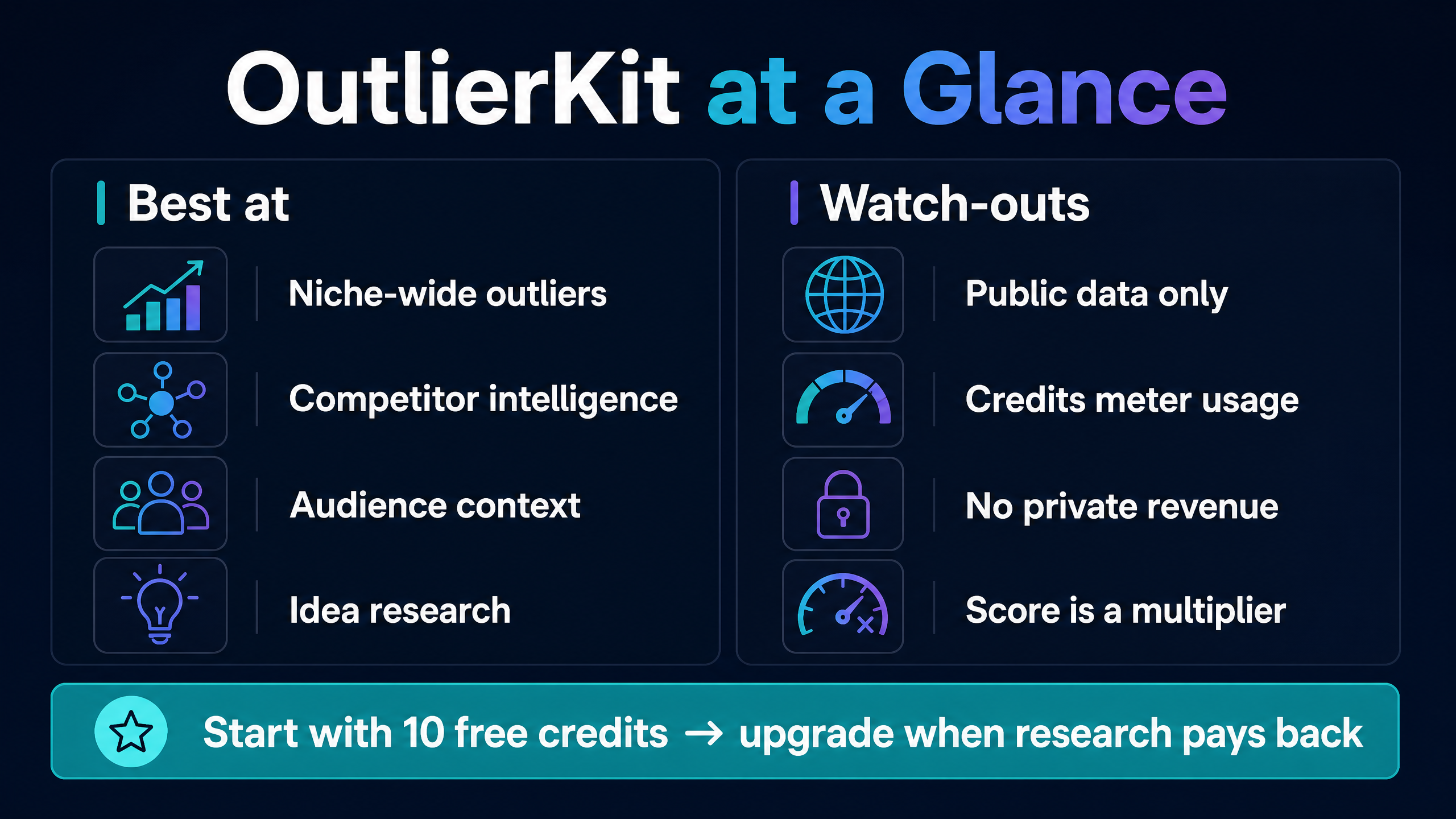
At-a-glance summary of OutlierKit’s research strengths and the limitations to check before paying.
Does OutlierKit provide YouTube analytics?
OutlierKit provides public-data research and competitive signals, but it should not be confused with private channel analytics. A comparison from TubeAnalytics describes OutlierKit as a pre-production research and idea-generation platform, while authenticated YouTube Analytics tools expose private metrics such as revenue, watch time, retention, CTR, and demographics for channels that authorize access.
That distinction answers several common searches for “OutlierKit YouTube analytics.” If you want to know why your latest video lost viewers at 45 seconds, start with YouTube Studio. If you want to know which competitor topics overperform relative to their channels, OutlierKit can provide a more relevant research path.
The two data types work well together. Use OutlierKit before filming to select and frame a topic. Use YouTube Studio after publishing to measure impressions, clicks, watch time, retention, returning viewers, and revenue. Then feed those lessons into the next research cycle.
Can OutlierKit analyze a channel you do not own?
Yes, the platform is designed to analyze public channels and competitor content without requiring access to the owner’s private YouTube Analytics account. The homepage says you can enter any public channel and begin without connecting your own channel.
Public data still has limits. You cannot infer a competitor’s exact RPM, private retention curve, revenue, or audience demographics from public view counts alone. Treat estimated audience patterns as research hypotheses, not as private facts.
What are OutlierKit’s main features?
What does OutlierKit keyword research do?
OutlierKit’s keyword research tool finds YouTube keyword ideas with search-volume and ranking-difficulty signals. The official homepage describes it as a way to find lower-competition, high-demand terms before you commit to a video.
Start with a specific viewer problem, not a broad category. “Best microphones” produces a crowded field. “Best USB microphone for untreated room” gives you a narrower intent that you can investigate against your audience and production capability.
Keyword data helps you decide how to phrase a topic. It does not guarantee that the phrase will rank or that searchers will prefer your video.
What does Script and Hook Analysis do?
Script and Hook Analysis evaluates a video’s opening and structure through signals such as hook strength, curiosity loops, pacing, emotional triggers, and payoff. The homepage lists the feature at 5 credits on the core tools section, while the pricing page lists video script analysis at 5 credits.
Use it as a diagnostic. If several successful videos reach the central tension within the first few seconds, compare that pattern with your own openings. Do not force every topic into the same hook template, because viewers can detect repetition.
What does Channel Analysis do?
Channel Analysis gives a deeper read of a single channel, including audience, formats, ideal video length, tone, and patterns behind strong-performing videos, according to OutlierKit’s product page.
That analysis can help you study positioning rather than isolated uploads. Look for recurring combinations of topic, format, length, and promise. Then decide whether your channel can serve the same viewer with a different angle.
What is Deep Research in OutlierKit?
Deep Research uses a larger credit allocation to analyze topics, trends, audience psychology, and content opportunities. The official pricing page lists 20 credits per Deep Research run.
Deep Research makes more sense after you narrow the question. Asking for “YouTube ideas” wastes the tool’s context. Asking which beginner questions remain unanswered in a specific niche gives the research a decision to support.
What is OutlierKit MCP?
OutlierKit MCP is a remote connector that lets Claude and compatible MCP clients call ten read-only YouTube research tools. The official documentation says Pro and Max users can connect https://outlierkit.com/mcp, sign in through Google OAuth, and use the same credit balance from the app.
Most MCP tool calls cost 1 credit. The live outlier refresh costs 5 credits because it queries YouTube live. Competitor Studio’s niche-wide mapping, audience psychographics, sponsor intelligence, and monetization work remain in the OutlierKit app.
MCP matters most to agencies, developers, and creators who already research inside Claude. It adds a conversational interface, not a free plan. You still need a paid Pro-or-higher account and credits.
Is OutlierKit safe to use?
OutlierKit’s public-data positioning reduces the need to connect a competitor’s YouTube account. The homepage says users can analyze public channels without connecting their own channel, and the MCP documentation describes its tools as read-only.
You should still inspect the login and consent screens. The MCP connection uses Google OAuth to match your OutlierKit account, while the separate app workflow may involve account and billing information. Use the official OutlierKit domain, avoid sharing a Google password, and review what access a connector requests.
Safety also involves interpretation. An outlier score can tempt you to copy a topic without understanding the audience or production context. Use the platform for research and pattern recognition, then create original content that serves a clear viewer need.
What are the best OutlierKit alternatives?
The best alternative depends on the question you need to answer. YouTube Studio is the strongest free option for your own channel performance. Google Trends helps you inspect broader interest over time. Social Blade provides public channel statistics. VidIQ and TubeBuddy combine keyword, optimization, and channel workflows. 1of10 also focuses on outlier discovery and content research.
Tool | Main strength | Data or workflow emphasis | Cost position | Choose it when |
YouTube Studio | First-party analytics | Your private channel performance | Free | You need retention, CTR, watch time, or revenue |
Google Trends | Search-interest context | Broader web and topic interest | Free | You want a quick trend check before deeper research |
Social Blade | Public channel statistics | Public views, subscribers, and history | Free and paid options | You need basic public benchmarks |
VidIQ | SEO and idea workflows | Keywords, AI guidance, competitor and outlier research | Lower entry pricing on public comparison pages | You need a broader creator suite and browser workflow |
TubeBuddy | Channel optimization and management | SEO, testing, bulk tools, and YouTube Studio workflow | Lower entry pricing on public listings | You need publishing and catalog operations |
1of10 | Outlier-focused research | Outlier videos and content inspiration | Similar paid research category | You want another specialized outlier database |
OutlierKit | Niche intelligence | Outliers, competitor discovery, psychographics, sponsors, and monetization | $29/month starting list price | You need pre-production research across a niche |
OutlierKit should not win a comparison just because its feature list is longer. It should win when niche-wide context changes your content decision more than first-party analytics, SEO checklists, or a manually maintained competitor list.
Is there a free OutlierKit alternative?
Yes. Combine YouTube Studio, YouTube search suggestions, Google Trends, public competitor pages, and a spreadsheet. You will not reproduce Competitor Studio’s niche-wide report, but you can validate a topic without a subscription.
OutlierKit’s 10-credit free trial provides a faster way to test the specialized workflow. The free trial does not provide enough credits for a 50-credit Competitor Studio scan, so it cannot demonstrate the full niche-wide feature.
Does OutlierKit have an affiliate program?
OutlierKit has an official affiliate-program page. A separate OutlierKit affiliate guide says the program offers 20% recurring commissions on the first 12 payments and a 30-day cookie, but partners should verify the current terms inside the affiliate portal before promoting those numbers.
This matters for review readers because affiliate content can sound more certain than the evidence supports. YT Crew should disclose any affiliate relationship near the first OutlierKit call to action and keep the verdict tied to documented use cases rather than commission value.
OutlierKit pros and cons
What does OutlierKit do well?
OutlierKit gives content research a sharper starting point than a generic idea generator. It connects outlier videos, keyword opportunities, channel patterns, audience context, and niche-level competitor discovery in one research environment.
The credit system also makes usage visible. You can estimate how many searches or reports your plan supports before you commit to a larger workflow, and you can top up when a project exceeds the monthly balance.
What are OutlierKit’s limitations?
The pricing is higher than free analytics and lower-cost browser tools, especially if you need only occasional keyword research. The credit meter adds a second budget to manage, and deep analyses can consume credits quickly.
The public documentation does not expose the full outlier-score algorithm. That makes the score useful as a relative filter, but it limits your ability to reproduce or audit the exact result independently.
OutlierKit also does not replace private channel analytics. You still need YouTube Studio or an authenticated analytics tool to understand retention, CTR, revenue, and other first-party performance measures.
Finally, the public plan ecosystem deserves careful checking. Official pages show Hobby, Pro, and Max, while some third-party pages show different prices or legacy plan names. Treat the official pricing page and live account checkout as the source of truth.
Final verdict: Is OutlierKit worth it?
This OutlierKit review reaches a neutral verdict: the tool is worth testing for creators who need structured pre-production research, niche-wide competitor analysis, and outlier discovery. It is less useful for creators who need private channel analytics, occasional keyword ideas, or a free all-purpose dashboard.
Start with the 10 free credits and test one real topic. Upgrade to Hobby if single-channel research and 100 monthly credits cover your work. Choose Pro when Competitor Studio, Deep Research, MCP, or recurring niche scans justify the $49 monthly list price or $299 annual payment. Consider Max only when you manage many channels, clients, or research-heavy workflows.
Your next step is specific: choose one topic you plan to film in the next 30 days, run Outlier Research and Keyword Research, record the credit cost, and compare the resulting idea with YouTube Studio data after publication. If the research changes a decision you would otherwise make poorly, OutlierKit may have earned its place. If it only produces attractive scores, keep the free workflow and use YT Crew’s free creator tools instead.
FAQ: OutlierKit questions creators search for
What is OutlierKit used for?
OutlierKit helps creators research outlier videos, keywords, competitor channels, audience patterns, scripts, hooks, trends, sponsors, monetization, and content opportunities using public YouTube data.
How does OutlierKit calculate the outlier score?
OutlierKit describes the score as a comparison between a video’s performance and its channel’s normal views. The public documentation does not provide the full proprietary formula, so explain the concept as video views divided by a chosen channel baseline, not as an exact reconstruction.
What does a 10x OutlierKit score mean?
A 10x score means the video performed at roughly ten times the channel’s normal level under OutlierKit’s scoring method. It does not mean the video has a 10% or 100% probability of going viral.
Is OutlierKit free?
OutlierKit offers 10 free credits without requiring a card. The ongoing Hobby, Pro, and Max plans are paid, and Competitor Studio requires Pro or Max access.
How much does OutlierKit cost in 2026?
The official pricing page lists Hobby at $29/month or $199/year, Pro at $49/month or $299/year, and Max at $199/month or $999/year. Annual-equivalent prices are about $16.60, $24.90, and $83 per month. Verify the live checkout for promotions, taxes, and billing terms.
What is the best OutlierKit plan?
Hobby fits one creator who needs 100 credits and single-channel research. Pro fits recurring research, niche-wide Competitor Studio, Deep Research, MCP, and 500 monthly credits. Max fits agencies and operators managing many channels with 2,000 monthly credits.
Does OutlierKit connect to my YouTube channel?
OutlierKit’s public research workflow can analyze public channels without connecting the channel owner’s private account. Its MCP documentation says the connector uses Google OAuth to match your OutlierKit account and provides read-only tools. Review the live consent screen before authorizing.
Does OutlierKit show YouTube revenue or retention?
No. OutlierKit focuses on public research and does not provide the private revenue, retention, watch-time, CTR, and demographic data available through authenticated first-party analytics tools.
What is OutlierKit Competitor Studio?
Competitor Studio is OutlierKit’s niche-wide intelligence feature. You enter one seed channel, and the tool maps competitors, outliers, audience psychographics, sponsors, monetization, performance benchmarks, and comments. It is available on Pro and Max and costs 50 credits per initial scan.
Is OutlierKit a YouTube competitor analysis tool?
Yes. OutlierKit provides single-channel analysis and the wider Competitor Studio workflow. Its differentiator is the attempt to discover and map a whole niche from one seed channel rather than relying only on a manually selected competitor list.
Does OutlierKit have an API or MCP server?
Yes. The official documentation lists API and MCP access on Pro and Max. The remote MCP connector provides ten read-only research tools, and most calls cost 1 credit from the same balance used in the app.
What is an OutlierKit alternative on Reddit?
Reddit discussions can surface creator opinions about OutlierKit, VidIQ, TubeBuddy, 1of10, and free research workflows, but those comments are anecdotal and can become outdated. Compare the actual job you need to complete, then test a free option before subscribing.
Does OutlierKit have an affiliate program?
Yes. OutlierKit has an official affiliate page. Its affiliate guide currently describes recurring commission terms, but partners should verify the rate, payment window, cookie duration, and eligibility in the live portal before publishing.