TubeRanker is a focused YouTube SEO suite for keyword research, tag generation, channel audits, title and description drafting, and video rank tracking. It makes the clearest case for creators who want structured search research and a small set of repeatable optimization tools rather than a large all-purpose social-media platform.
The monthly Basic plan is listed at $9.90 and includes 50 keyword searches and 20 tracked keywords. The monthly Advanced plan is listed at $19.90 and includes 250 keyword searches and 100 tracked keywords. Annual billing is advertised at 50% off, with listed monthly equivalents of $4.95 for Basic and $9.95 for Advanced, billed at $59.40 and $119.40 per year respectively.
TubeRanker can save time when you research many videos, track search positions by geography, or audit a channel for missing metadata and performance signals. It cannot guarantee rankings, replace YouTube Studio, or turn tags and SEO scores into watch time.
This TubeRanker review breaks down the current public pricing, the difference between keyword searches and tracked keywords, the strongest tools, the accuracy caveats, cancellation terms, and the creators who should pay for it. It also includes a practical test you can run before committing to a subscription.
What is TubeRanker?
TubeRanker is a web-based YouTube SEO and productivity toolkit operated by SEOptimer Limited, according to its Terms of Service. The homepage positions the product around optimizing videos for YouTube and Google search, researching topics, generating metadata, auditing channels, and monitoring rankings.
The main tools listed on the homepage are Tag Generator, Channel Audit, Keyword Tool, Rank Tracker, Tag Extractor, Hashtag Generator, Title Generator, and Description Generator.
That tool list tells you what TubeRanker is not. It is not a complete replacement for YouTube Studio, a video editor, a thumbnail design application, or a private audience-intelligence platform. It sits before and beside publishing, helping you choose and document optimization decisions.
Does TubeRanker require a YouTube login?
TubeRanker’s public pages describe URL and keyword-based workflows, while its Terms require an account for subscriptions and contain account-security rules. The homepage does not present the suite as a YouTube Studio replacement that needs full channel access for every tool.
Check the current consent screen for the exact tool you plan to use. Do not share your Google password with a third-party site, and do not assume that an SEO lookup can access private retention, revenue, traffic-source, or audience data.
How much does TubeRanker cost?
TubeRanker’s pricing page lists two monthly plans and two annual-billing equivalents. The Basic and Advanced plans share the same generator and audit entitlements, but Advanced increases the monthly keyword-search allowance and tracked-keyword capacity.
Plan | Listed price | Keyword searches | Tracked keywords | Other listed access |
Basic monthly | $9.90/month | 50/month | 20 | Unlimited channel audits, tag extraction, hashtags, titles, descriptions |
Advanced monthly | $19.90/month | 250/month | 100 | Unlimited channel audits, tag extraction, hashtags, titles, descriptions |
Basic annual | $59.40/year, shown as $4.95/month | 50/month | 20 | Same listed feature access as Basic monthly |
Advanced annual | $119.40/year, shown as $9.95/month | 250/month | 100 | Same listed feature access as Advanced monthly |
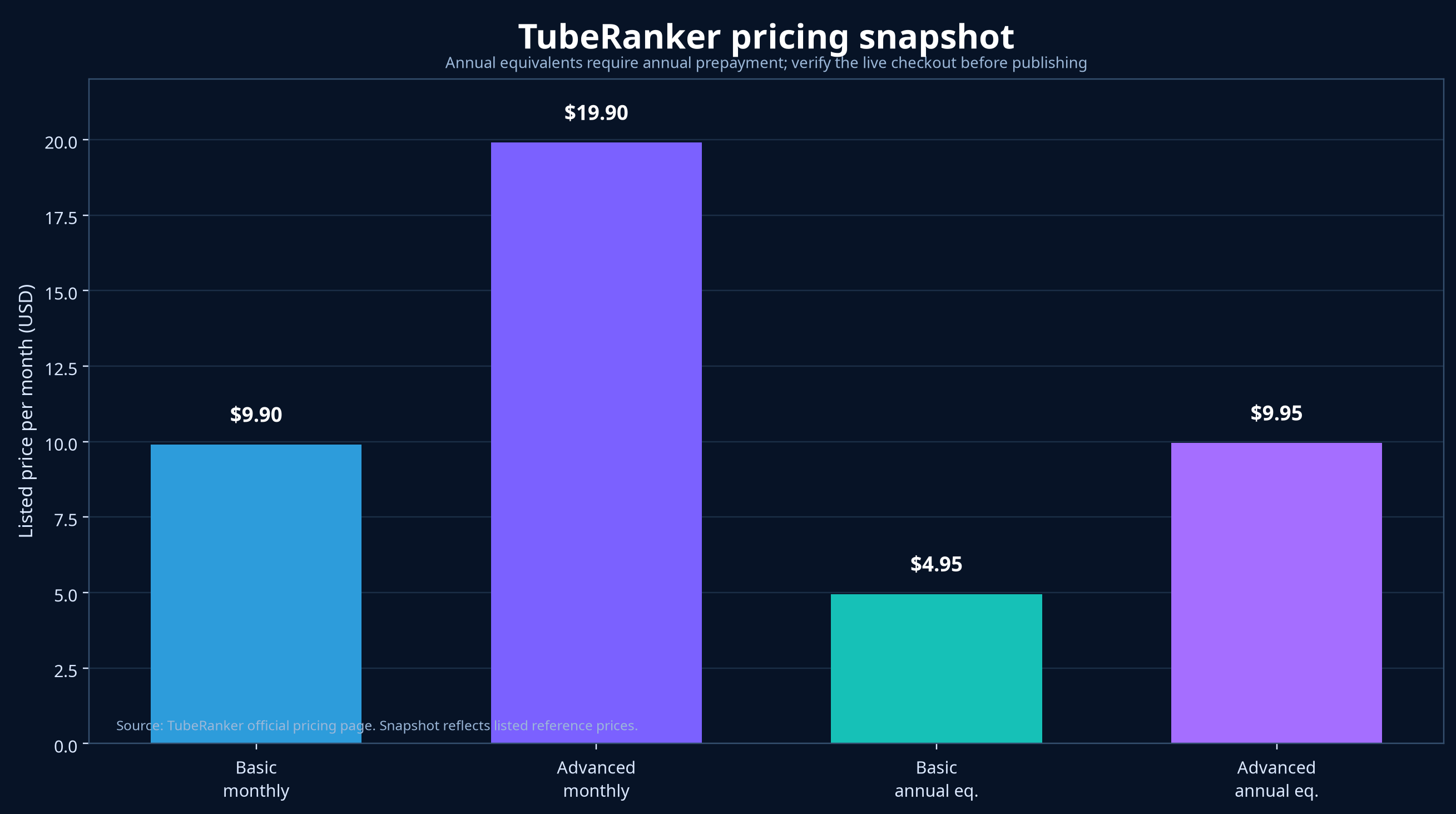
Price snapshot from the official TubeRanker pricing page. Annual equivalents require annual prepayment, and live checkout terms can change.
Is TubeRanker’s annual plan cheaper?
Yes, the listed annual equivalents are lower than the monthly prices. Basic annual billing totals $59.40, while twelve Basic monthly payments would total $118.80. That is a listed difference of $59.40 before taxes or any pricing changes.
Advanced annual billing totals $119.40, while twelve Advanced monthly payments would total $238.80. That produces a listed difference of $119.40 before taxes or changes to the live offer.
The arithmetic is straightforward, but the decision is not. Annual billing makes sense only if you expect to use the keyword and rank-tracking limits for enough months to recover the commitment. Test the workflow first if you are still learning YouTube SEO.
What is the difference between keyword searches and tracked keywords?
A keyword search is a research action. You enter or investigate a term to see available search information. A tracked keyword is an ongoing monitoring slot that follows a video’s position for a term over time.
The difference matters because a plan can give you many research searches but fewer persistent tracking slots. On Basic, the listed ratio is 50 keyword searches to 20 tracked keywords. On Advanced, it is 250 searches to 100 tracked keywords.
Use searches during topic planning. Reserve tracked keywords for videos that already matter to your channel, such as your core tutorials, revenue pages, or campaigns you plan to update.
What features does TubeRanker include?
TubeRanker combines research, optimization, and measurement tools in one workflow. The strongest value comes from using the tools together rather than treating a generated title or tag list as a finished strategy.
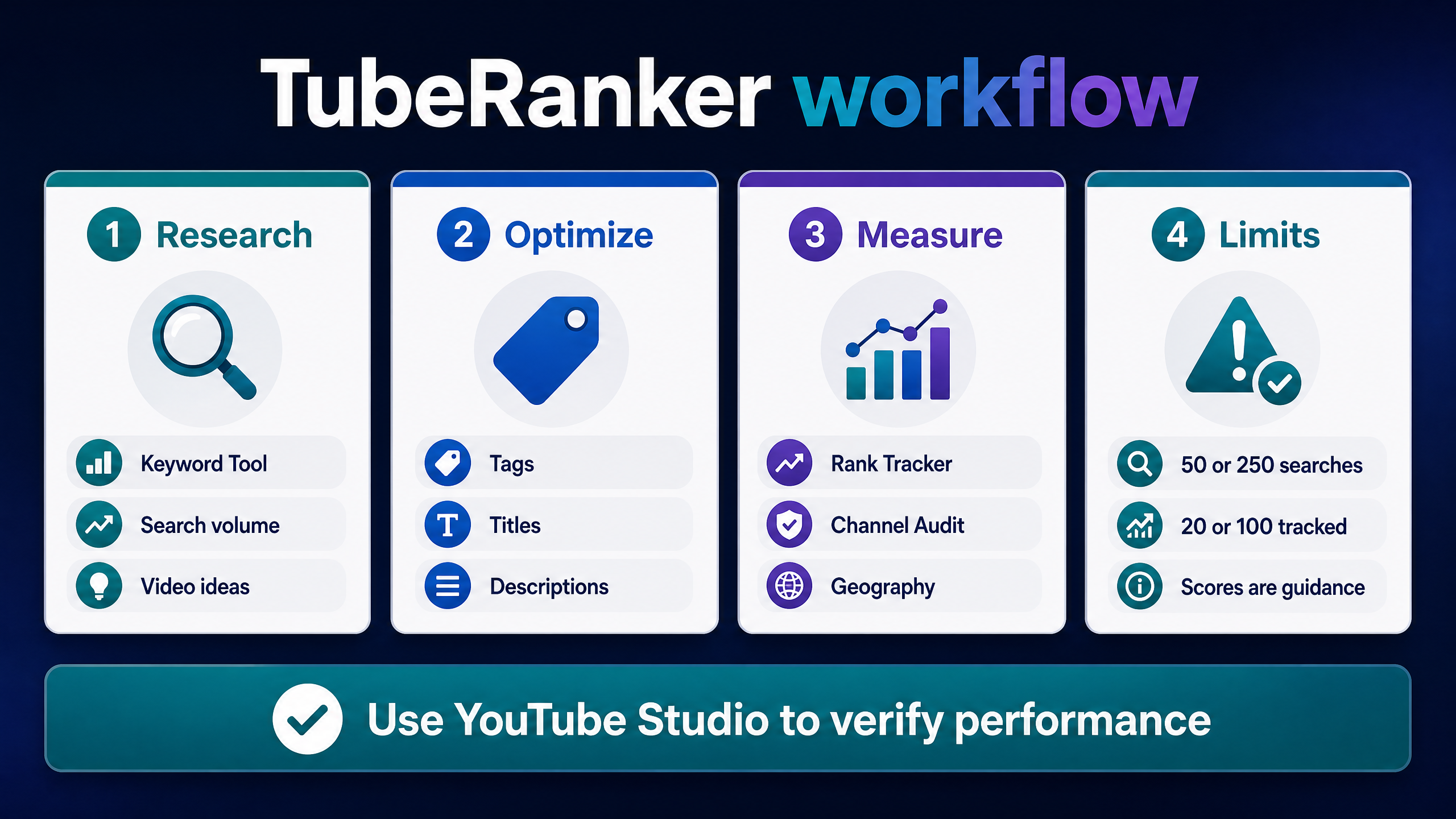
TubeRanker supports the workflow, but YouTube Studio should verify the performance result.
How does the TubeRanker Keyword Tool work?
TubeRanker describes its Keyword Tool as a way to research YouTube keywords and surface search volume for target terms. This can help you replace a vague topic with a more specific phrase that has visible demand.
A keyword tool answers one part of the question. It can suggest that viewers search for a phrase, but it cannot tell you whether your channel can win the click, satisfy the viewer, or produce a better video than the current results.
Use the result to build a topic brief with four fields: target phrase, viewer problem, competing promise, and your original proof. That process turns keyword research into a video decision instead of a list of attractive numbers.
How does TubeRanker Rank Tracker work?
The Rank Tracker monitors how a video ranks in YouTube search for a specific keyword and geography, according to the homepage. Geographic tracking can help agencies and local creators see how search visibility changes by market.
Rank data changes with location, device, query wording, personalization, language, timing, and the search surface. Treat a rank position as a dated observation, not a permanent property of the video.
Record the keyword, country, device if available, URL, date, and position. Compare the same setup over time. Do not interpret a rank change as proof that one metadata edit caused a performance change unless you control the other variables.
Who should use TubeRanker?
TubeRanker suits creators who publish consistently enough to use keyword research, track search terms, and revisit metadata. It also suits agencies that need a shared process for channel audits and client reporting.
The Basic plan may fit a small channel that needs occasional searches, 20 tracked keywords, and unlimited generators and audits. Advanced becomes more logical when you research many ideas each month or monitor more than 20 important keyword positions.
TubeRanker is less suitable if you only publish a few videos per year, rely mostly on recommendation traffic, or want one tool to create, edit, design, publish, and measure a video from beginning to end.
Is TubeRanker worth paying for?
TubeRanker is worth paying for when its keyword and rank limits remove a recurring bottleneck. The value does not come from a title generator alone. It comes from a repeatable workflow that helps you research a phrase, audit the channel, prepare metadata, track a target, and document the result.
The Basic plan gives you the lower-cost entry point. Advanced is justified only if 50 monthly searches or 20 tracked keywords restrict your work. Annual billing offers the largest listed discount, but you should verify that the tool earns its place before paying for a year.
TubeRanker is not worth paying for if you expect an SEO score or tag list to deliver views by itself. Beginners can cover many foundational tasks with YouTube Studio, YouTube autocomplete, Google Trends, and YT Crew before adding a paid rank tracker.
How should you test TubeRanker before paying?
Choose five upcoming video ideas and record the exact questions you want the tool to answer. Run the keyword research, select one target phrase per idea, generate a draft title and description, and audit your existing channel.
Track only the keywords that matter most. Record each keyword, geography, date, starting position, title, thumbnail, and the change you make. After publishing, compare impressions, click-through rate, watch time, retention, and traffic sources in YouTube Studio.
After two or three publishing cycles, calculate the time saved and the decisions improved. If TubeRanker helps you produce better briefs or maintain a useful tracking history, the subscription may fit. If it only produces scores you do not act on, keep the money and use a free workflow.
FAQ: TubeRanker questions creators search for
What is TubeRanker?
TubeRanker is a YouTube SEO toolkit with keyword research, channel audits, rank tracking, tag extraction, tag and hashtag generation, title generation, and description generation.
Is TubeRanker free?
The public pricing page lists paid Basic and Advanced plans. The Terms mention that some plans may offer a free trial, but a card is required for trial accounts under the published terms. Check the live signup flow for the current trial and any free-tool access.
How much does TubeRanker cost?
The listed monthly prices are $9.90 for Basic and $19.90 for Advanced. Annual billing is listed at $59.40 for Basic and $119.40 for Advanced, displayed as $4.95 and $9.95 per month equivalents.
Is TubeRanker worth it?
TubeRanker can be worth paying for if you need repeatable keyword research, geography-based rank tracking, channel audits, and published metadata quotas. It is less valuable if you only need occasional title ideas or expect SEO scores to create views without improving the video.
What does TubeRanker’s Basic plan include?
Basic includes 50 keyword searches per month, 20 tracked keywords, unlimited channel audits, unlimited tag extraction, unlimited hashtag generation, unlimited title generation, and unlimited description generation on the official pricing page.
What does TubeRanker Advanced include?
Advanced includes 250 keyword searches per month, 100 tracked keywords, and the same listed unlimited audit and generator access shown for Basic.
What is the difference between TubeRanker searches and tracked keywords?
Searches help you research terms. Tracked keywords are ongoing monitoring slots for following video positions over time. Basic lists 50 searches and 20 tracked keywords, while Advanced lists 250 searches and 100 tracked keywords.
Does TubeRanker have a keyword tool?
Yes. TubeRanker’s homepage describes a Keyword Tool that researches YouTube keywords and surfaces search volume for target phrases.
Does TubeRanker track YouTube rankings?
Yes. The Rank Tracker is described as monitoring a video’s position for a keyword in YouTube search and allowing geography-specific tracking.
Does TubeRanker audit YouTube channels?
Yes. The Channel Audit accepts a channel name or URL and lists checks for channel completeness, branding, subscribers, views, watch time, retention at 30 seconds, engagement, and description-link clicks.
Does TubeRanker generate YouTube tags?
Yes. It lists both Tag Generator and Tag Extractor. The Generator suggests tags from a topic or keyword, while the Extractor reveals tags used by a public video or competitor.
Can TubeRanker improve YouTube rankings?
It can help you research keywords, prepare metadata, and monitor search positions. It cannot guarantee rankings because YouTube also responds to viewer choice, watch behavior, relevance, satisfaction, competition, and recommendation signals.
Is TubeRanker safe?
Use the official domain, review its privacy and account terms, protect your password, and avoid automated scraping without permission. TubeRanker’s Terms prohibit misleading or malicious use and acknowledge that data cannot be 100% accurate.
Does TubeRanker replace YouTube Studio?
No. TubeRanker supports SEO and public channel checks. YouTube Studio remains the better source for private impressions, click-through rate, retention, audience, traffic-source, revenue, and trends data.
How do I cancel TubeRanker?
Cancel through the cancellation link in the Account screen. The Terms say an email or phone request alone does not count as cancellation.
Does TubeRanker offer a refund?
The Terms say support may refund an invoice when requested within seven days after payment and alongside account cancellation. The Terms exclude partial-month refunds and unused open-account months. Confirm the current policy before relying on it.
What is the best TubeRanker alternative?
Use YouTube Studio for private analytics, YT Crew for free creator utilities, Google Trends and YouTube autocomplete for broad research, vidIQ or TubeBuddy for broader creator suites, and OutlierKit or 1of10 for outlier-focused research.
Conclusion: is TubeRanker worth paying for?
TubeRanker is a focused option for creators who need keyword research, channel audits, metadata generators, and geography-based rank tracking. Its listed prices and quotas make the decision measurable: Basic provides 50 searches and 20 tracked keywords, while Advanced provides 250 searches and 100 tracked keywords.
The tool cannot guarantee rankings, replace YouTube Studio, or prove that tags caused a video to grow. Treat scores and estimates as guidance, record your inputs, and measure the result with first-party Analytics.
Your next step is to test five video ideas with TubeRanker’s keyword workflow, then compare the time and decisions against YT Crew’s free YouTube creator tools before choosing a monthly or annual plan.