vidIQ fits creators who need help deciding what to make next. TubeBuddy fits creators who spend more time optimizing, testing, and maintaining an existing YouTube catalog.
That split matters more than a long feature checklist. vidIQ emphasizes ideas, trends, competitor and outlier research, AI Coach, thumbnail creation, and guidance. TubeBuddy emphasizes YouTube Studio workflows, bulk editing, SEO Studio, testing, and a lower paid entry price on the current official comparison page.
Both tools offer free access, keyword research, YouTube SEO features, thumbnail tools, and browser extensions. Neither tool guarantees views, ranking, or subscriber growth, and neither replaces YouTube Studio’s first-party performance data.
For most new creators, start with the free version of the tool that matches your immediate bottleneck. Choose vidIQ when topic selection feels difficult. Choose TubeBuddy when upload optimization or catalog maintenance consumes your time. Eligible creators can also use YouTube’s native title and thumbnail tests, which compare up to three variants by watch time.
This comparison covers pricing, free versions, keyword research, AI, thumbnail testing, bulk editing, automation, safety, alternatives, and the practical difference between the two workflows.
What is the difference between vidIQ and TubeBuddy?
vidIQ and TubeBuddy are third-party YouTube creator tools that place research and optimization features beside or inside your publishing workflow. Both can help with keywords, titles, thumbnails, and channel decisions, but they emphasize different jobs.
vidIQ’s current comparison page frames its product around research and guidance. Its features include personalized ideas, trends, competitor and outlier research, AI Coach, subscriber insights, and AI-assisted thumbnail work.
TubeBuddy’s current comparison and pricing pages frame the product around optimization and channel management. Its strengths include SEO Studio, testing, bulk processing, upload workflows, metadata updates, and tools that operate inside YouTube Studio.
You can think of the difference in two questions:
If your question sounds like this... | Start with... | Why |
“What topic should I make next?” | vidIQ | It connects ideas, trends, competitors, outliers, and AI guidance. |
“Which topic has search demand?” | Either | Both offer keyword research, but they present different signals and workflows. |
“How do I improve this upload?” | TubeBuddy | It emphasizes SEO Studio, metadata, tags, and upload optimization. |
“How do I test thumbnails or titles?” | TubeBuddy or YouTube Studio | TubeBuddy has a testing workflow; YouTube also offers native testing to eligible creators. |
“How do I edit hundreds of old videos?” | TubeBuddy | Its Legend tier includes bulk processing and editing tools. |
“How do I understand my next growth opportunity?” | vidIQ | Its AI Coach, trends, competitor, and subscriber-insight features target that question. |
vidIQ vs TubeBuddy feature comparison
The most useful comparison looks at how each feature works, not whether both tools include a checkbox with the same name. The table below uses the current official comparison and pricing pages, with YouTube’s own documentation added for native testing.
Feature | vidIQ | TubeBuddy | Better fit |
Free version | 150 AI credits each month, niche trends, data-backed ideas, and AI Coach growth tips | Limited keyword, SEO, thumbnail, productivity, and research tools | Tie, depending on the task |
Entry paid plan | Boost: $19 monthly or $199 yearly, about $16.58 per month annually | Pro: $15 monthly or $144 yearly, $12 per month annually | TubeBuddy on price |
Higher self-serve plan | Max: $49 monthly or $468 yearly, about $39 per month annually | Legend: $32.99 monthly or about $316.68 yearly, about $26.39 per month annually | TubeBuddy on price, vidIQ on AI allowance |
Ideas and trends | Personalized ideas, trends, AI Coach, competitor and outlier research | Next Video Ideas, Video Topics AI, title generation, Suggested Shorts | vidIQ for research depth |
Keyword research | Search volume, competition, questions, and rising keywords | Keyword Explorer, tag data, SEO Studio, and search signals | Tie, with different interfaces |
Thumbnail workflow | AI generation, prompt-based editing, and analysis | Thumbnail generator, analyzer, and testing workflow | vidIQ for creation; TubeBuddy for testing |
A/B testing | No dedicated test tool listed; YouTube native testing remains available | Dedicated testing workflow plus YouTube native testing | TubeBuddy, with YouTube as an alternative |
Bulk editing | Limited emphasis on catalog-wide management | Bulk metadata, cards, end screens, tags, and overlays | TubeBuddy |
Browser extension | Research and optimization insights inside YouTube | SEO and productivity tools inside YouTube Studio | Tie |
Creator guidance | AI Coach, in-feed opportunities, and optional human coaching | Tutorials, support, and enterprise training | vidIQ for individual guidance |
Best for | Deciding what to create and how to package it | Optimizing and managing what you already publish | Depends on your bottleneck |
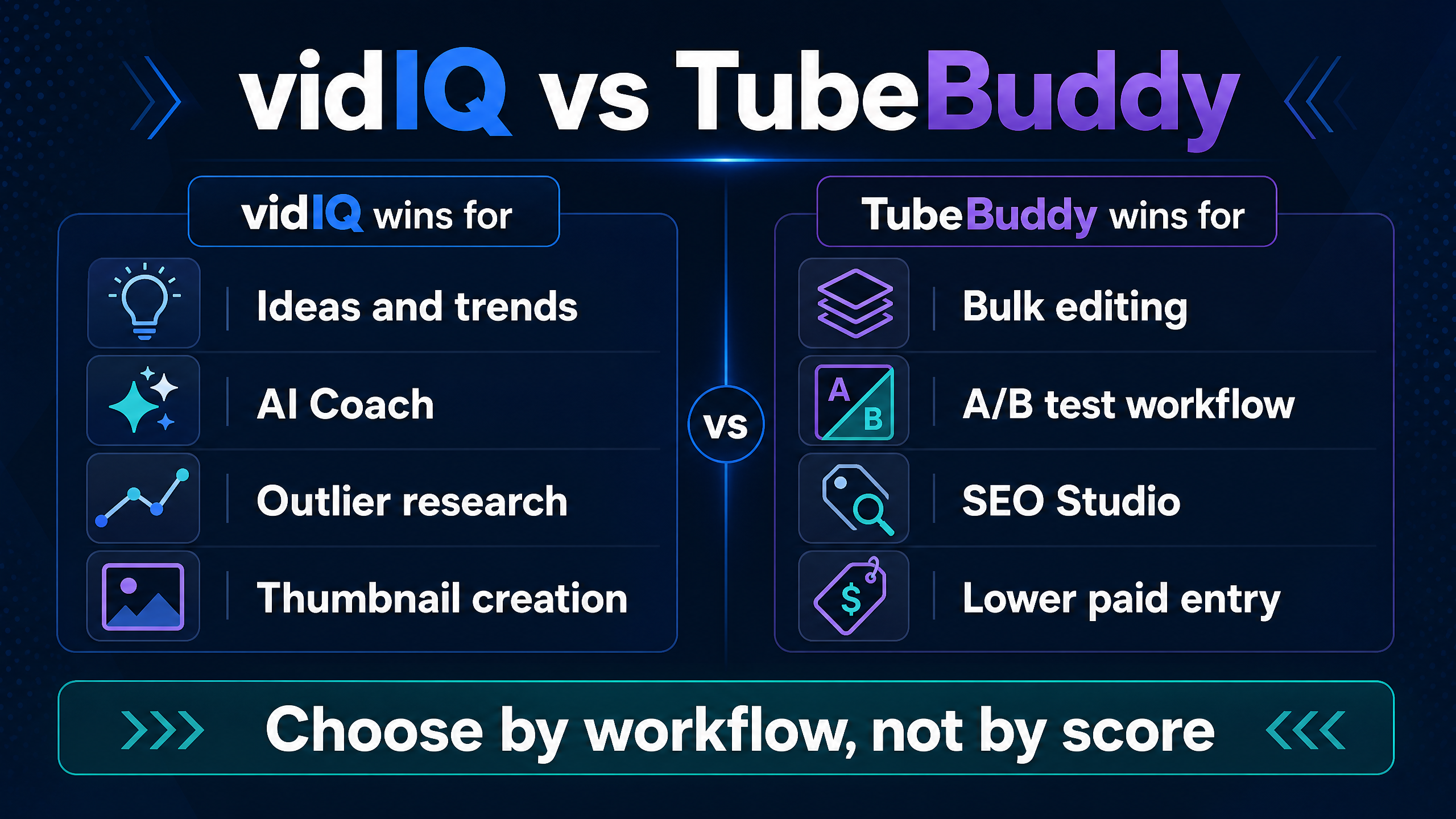
The main trade-off in one view: vidIQ leans toward research and guidance, while TubeBuddy leans toward testing and channel operations.
Is vidIQ or TubeBuddy cheaper in 2026?
TubeBuddy currently has the lower paid entry price in the official comparison page’s US reference prices. TubeBuddy Pro costs $15 month to month or $144 per year, which equals $12 per month when you divide the annual total by 12. vidIQ Boost costs $19 month to month or $199 per year, which equals about $16.58 per month.
At the next self-serve tier, TubeBuddy Legend costs $32.99 monthly or about $316.68 annually, while vidIQ Max costs $49 monthly or $468 annually. TubeBuddy costs less at both reference tiers, but the plans do not offer identical features or credit systems.
vidIQ’s current pricing page also lists monthly AI allowances: 150 AI credits for Free, 2,000 for Boost, and 6,000 for Max. TubeBuddy’s pricing page presents feature access rather than a comparable all-product AI-credit balance, so you should not compare “credits” as if the products meter the same actions.
The chart below uses the official comparison page’s US references. Prices can change with region, tax, promotions, billing selector, and plan access.
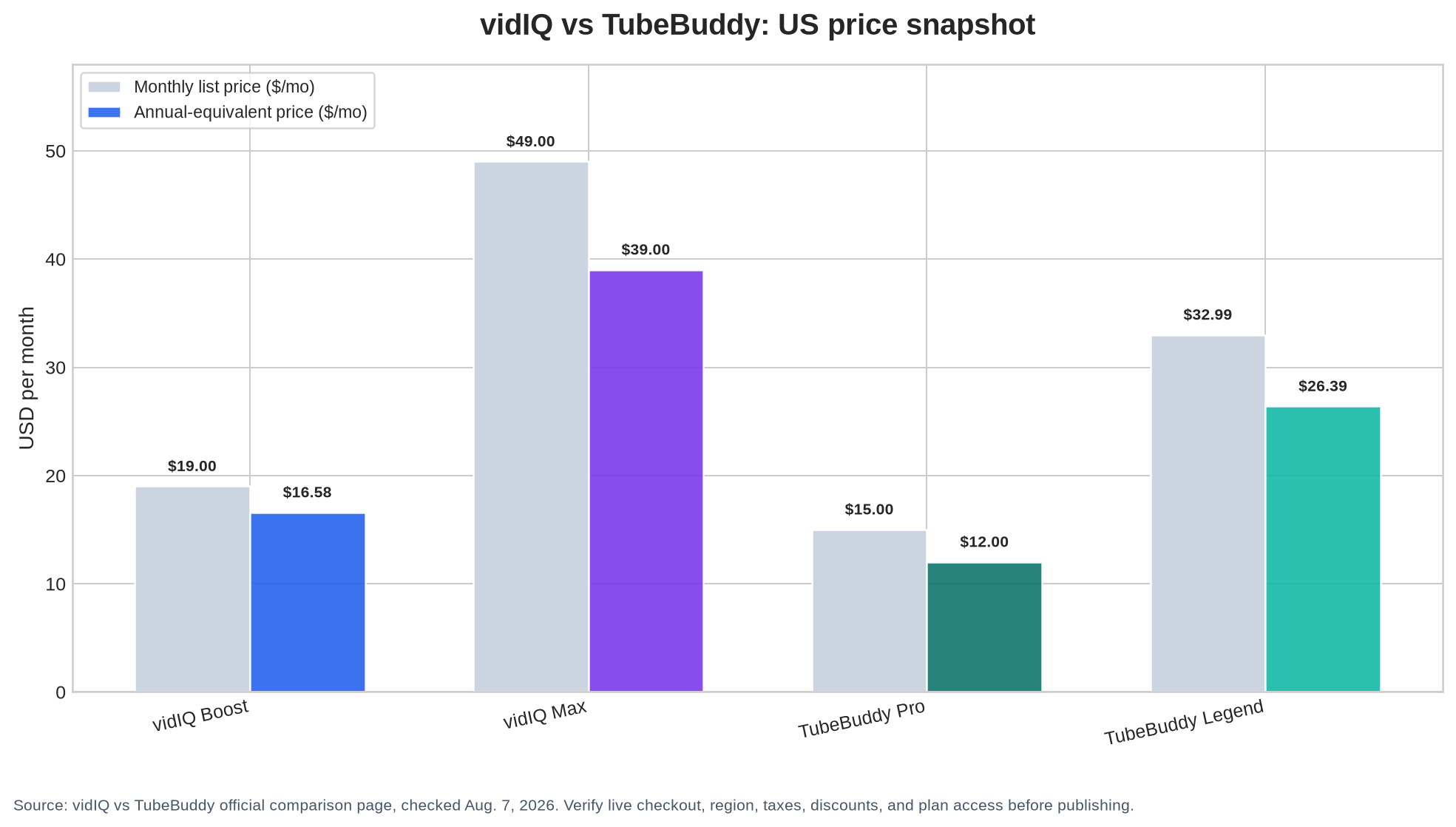
US price snapshot from the official vidIQ comparison page, checked August 7, 2026. Confirm the final checkout total before purchasing.
Which pricing plan should a solo creator choose?
Choose TubeBuddy Pro when you want a low-cost starting point for basic SEO, video tools, thumbnails, and upload optimization. Choose vidIQ Boost when you want more monthly AI capacity, personalized ideas, unlimited trends research, subscriber insights, and deeper AI Coach guidance.
Choose TubeBuddy Legend when you need bulk editing, full search and SEO access, advanced reporting, audience-understanding tools, and a testing workflow. Choose vidIQ Max when the higher AI allowance and deeper strategy work matter more than catalog maintenance.
Do not buy either higher plan because a pricing page shows more checkmarks. First, name the repeated task you want to complete each week. Then check whether the paid plan includes that task without an extra limit, add-on, or license restriction.
Which tool has the better free version?
vidIQ’s free plan gives you 150 AI credits each month, niche trends, data-backed ideas, and personalized growth tips from AI Coach. That makes the free version useful for topic discovery and early planning, although the paid plan unlocks more AI capacity and deeper features.
TubeBuddy offers a free version with limited access to keyword, SEO, thumbnail, productivity, and research tools. The official pricing page does not present the free plan as a full replacement for Pro or Legend. It works better as a way to test the extension and see whether its workflow fits your YouTube Studio routine.
If your first task involves idea generation, vidIQ’s free allowance may feel more useful. If your first task involves metadata, basic SEO, or getting familiar with an extension inside YouTube Studio, TubeBuddy’s free version may feel more direct.
Neither free version gives you a reason to skip YouTube Studio. YouTube already provides channel analytics, upload controls, audience reports, and native title and thumbnail testing for eligible videos.
Which tool is better for keyword research?
Neither tool wins for every keyword workflow. vidIQ’s official comparison highlights search volume, competition, questions, and rising keywords. TubeBuddy pairs Keyword Explorer with tag data and SEO Studio.
vidIQ works well when keyword research begins with a broad content decision. You can move from a trend or competitor signal to a topic, then use keywords to sharpen the title and viewer promise.
TubeBuddy works well when keyword research happens during upload optimization. You can assess a phrase, refine the title and tags, and move through the metadata workflow without leaving the YouTube Studio environment.
Treat keyword scores as research signals rather than predictions. Search volume does not guarantee that a viewer will click your result, and an SEO score does not guarantee impressions. YouTube still weighs viewer satisfaction, watch time, relevance, packaging, competition, and the context of the recommendation surface.
How should you compare keyword results from vidIQ and TubeBuddy?
Use the same phrase in both tools, record the displayed search and competition signals, then inspect the actual YouTube results. Look for the age of the top videos, their audience size, the quality of their answers, the strength of their thumbnails, and the intent behind the query.
A practical keyword decision uses three inputs:
Topic opportunity = viewer need × your credibility × realistic competition.
The tools can help with competition and demand signals. You supply the viewer need and credibility check. If you cannot make a better or more useful video for the query, a favorable score should not decide the topic.
Which tool is better for video ideas and AI guidance?
vidIQ has the clearer advantage for creators who want a guided ideation process. Its official pages highlight personalized ideas, trends, AI Coach, competitor and outlier research, and subscriber insights.
TubeBuddy has expanded its own idea features. Its current plan page lists Next Video Ideas, and the comparison page lists Video Topics AI, title generation, and Suggested Shorts. TubeBuddy can therefore support ideation, but its overall positioning still points toward a wider optimization and management workflow.
AI guidance helps when you give it a specific decision. Ask which viewer problem your next three uploads should address, which audience segment the topic fits, or how two title promises differ. Avoid asking for generic viral ideas and copying the first list it returns.
Does either tool predict whether a video will go viral?
No. Both tools can surface patterns, scores, trends, or recommendations, but those signals do not remove uncertainty. A high opportunity score can point you toward a topic that fails because the hook misses, the thumbnail confuses, the video arrives late, or the audience does not care about your version.
Use AI to create and compare options. Let your own editorial judgment, audience knowledge, and post-publish analytics decide what you repeat.
Which tool has better thumbnail tools and A/B testing?
vidIQ emphasizes AI thumbnail generation, prompt-based editing, and thumbnail analysis. TubeBuddy offers a thumbnail generator and analyzer, then adds its own testing workflow according to the official comparison page.
TubeBuddy wins if you want testing inside a broader upload-optimization process. vidIQ wins if you want help creating thumbnail concepts before you open YouTube Studio.
YouTube’s native tool changes the price calculation. Eligible creators can test up to three titles, thumbnails, or title-and-thumbnail combinations on desktop. YouTube selects the option with the highest watch time, and a test can run for a few days or up to two weeks.
YouTube also warns that its concurrent experiments can produce different results from third-party tools that run sequential tests or optimize for CTR instead of watch time. That means a TubeBuddy test result and a YouTube-native result may not answer the same question.
What should you test first?
Test one meaningful packaging difference at a time. Compare a specific promise against a curiosity-led promise, or compare a clear subject image against a stronger contrast and visual hierarchy. Avoid three versions that differ only by a comma or a small color change.
Use older videos when possible, because a test on an established upload can reduce the effect of launch timing on your current release schedule. Then judge the winner by the metric that matches your goal, not by a third-party score alone.
Which tool is better for bulk editing and automation?
TubeBuddy has the clear advantage for bulk channel management. Its Legend plan includes bulk processing and editing tools, and the official comparison page lists bulk updates for metadata, cards, end screens, tags, and overlays.
That feature matters when you manage a large catalog. Changing a link or standard description across 200 videos manually creates repetitive work, while a bulk workflow can turn the task into a controlled review and approval process.
vidIQ focuses more on research and optimization than catalog-wide editing. Its official comparison page labels bulk channel management as limited, which makes vidIQ a weaker choice if your main task involves maintaining a back catalog.
The word “automation” needs a boundary. Bulk editing, scheduled research, metadata templates, and workflow reminders can save time. Automated views, likes, comments, subscribers, sub4sub activity, or misleading engagement tactics create policy and channel-safety risks.
YouTube prohibits spam and deceptive practices, including malicious clickbait that promises an experience the video does not deliver. Use either tool to improve legitimate production work, not to manufacture engagement or mislead viewers.
The practical distinction: vidIQ helps more before production, while TubeBuddy helps more during upload, testing, and catalog maintenance.
Which browser extension fits YouTube creators better?
Both tools offer browser extensions that place research or optimization signals near YouTube. vidIQ’s extension supports research and optimization insights. TubeBuddy’s extension emphasizes SEO and productivity tools inside YouTube Studio.
A browser extension can shorten the distance between a question and an action, but it can also add visual noise. Install one tool first, learn the workflow, and disable features that distract you from the actual viewer and video.
Use the extension to inspect a decision, not to outsource one. If a score tells you a title is weak, read the title aloud, compare the promise with the video, and inspect the search results before changing it.
Is vidIQ or TubeBuddy safer for your channel?
Both products require you to review permissions during setup, because the tools integrate with YouTube workflows. TubeBuddy’s pricing page says you sign up, install the browser extension, and authorize TubeBuddy to access your channel so the tools can appear in YouTube Studio.
The official vidIQ comparison page describes its extension and channel guidance features, but the exact permission screen can change by product flow and account type. Open the current consent screen, check the requested scopes, and use the official domains: vidiq.com and tubebuddy.com.
Safety also includes data interpretation. A third-party score can influence your publishing decisions, but no score knows your full production constraints, audience relationship, or editorial standards. Keep the tool’s output as input, not as an order.
Does using vidIQ or TubeBuddy violate YouTube’s rules?
Using a legitimate research or optimization tool does not, by itself, equal prohibited engagement manipulation. The risk comes from the action you take, such as deceptive metadata, spam, artificial traffic, or misleading packaging.
Read the latest YouTube policies and the tool’s current permissions before connecting an account. Do not share your Google password with a third-party service, and remove access from your Google account if you stop using the product.
What are the best vidIQ and TubeBuddy alternatives?
You do not need a paid extension for every YouTube task. YouTube Studio remains the strongest free source for your own channel performance because it can show first-party analytics that third-party public research tools cannot reproduce.
Google Trends and YouTube autocomplete can help you test broad interest and phrase variations. YT Crew’s free creator tools can fill gaps such as keyword exploration, title drafting, and other publishing tasks, depending on the specific tool you choose.
The best alternative depends on the missing function:
Your need | Alternative to test | Why it may fit |
Private retention, CTR, watch time, and revenue | YouTube Studio | It uses your own first-party channel data. |
Broad topic interest | Google Trends | It gives a quick time-based interest check. |
Public channel benchmarks | Social Blade | It offers public channel and history signals. |
Specialized outlier research | OutlierKit or 1of10 | These tools focus more on outlier discovery and content research. |
Free creator workflow support | YT Crew tools | You can test a free alternative before adding another subscription. |
Bulk catalog operations | TubeBuddy Legend or manual YouTube Studio workflows | The choice depends on catalog size and your tolerance for manual work. |
A free alternative will not reproduce every paid feature. It can still answer the question that matters most: whether the next topic or packaging decision improves after research.
vidIQ pros and cons
What does vidIQ do well?
vidIQ connects idea discovery, trend research, competitor signals, AI Coach guidance, thumbnail creation, optimization, and subscriber insights in a workflow aimed at the next video. Its current Free, Boost, and Max plans also make AI-credit capacity visible, which helps you estimate how often you will use those features.
Where does vidIQ fall short?
vidIQ does not offer a dedicated A/B testing tool on its official comparison page, and it places less emphasis on bulk catalog management. Creators who mainly need large-scale metadata edits or a testing workflow may get more value from TubeBuddy or YouTube’s native testing option.
TubeBuddy pros and cons
What does TubeBuddy do well?
TubeBuddy combines a lower paid entry price with SEO Studio, testing, bulk processing, metadata workflows, and YouTube Studio integration. Legend adds the tools that matter most when your channel already has a substantial catalog to maintain.
Where does TubeBuddy fall short?
TubeBuddy’s free and Pro tiers limit access to the deeper strategy, audience, bulk, and topical-analysis features listed on the current pricing page. Creators who want personalized ideation and AI-led research may find the workflow less direct than vidIQ’s.
Which should you choose: vidIQ or TubeBuddy?
Choose vidIQ if you need to generate and evaluate ideas, follow trends, study competitors and outliers, use AI Coach, or improve thumbnail concepts before production. Its higher paid tiers make more sense when you use AI and research tools often enough to justify the monthly allowance.
Choose TubeBuddy if you need SEO Studio, upload optimization, title and tag workflows, thumbnail testing, bulk editing, or catalog maintenance. Its lower current US reference price makes it the easier paid entry for budget-conscious creators who already know what they want to publish.
Choose YouTube Studio instead if you mainly need private performance analytics or native title and thumbnail tests. Choose both only when you can name two separate recurring jobs, one for research and one for catalog operations.
The most useful seven-day test is straightforward. Use vidIQ for one upcoming topic, then use TubeBuddy or YouTube Studio to package and evaluate the upload. Record the time spent, the decisions each tool changed, and the post-publish result. Keep the subscription that improves a repeated decision, not the tool with the more impressive score.
FAQ: vidIQ versus TubeBuddy questions creators search for
Is TubeBuddy better than vidIQ?
TubeBuddy is better for bulk editing, SEO Studio, testing workflows, and lower paid entry pricing. vidIQ is better for personalized ideas, trends, AI Coach, competitor and outlier research, and AI-assisted thumbnail creation. Your publishing bottleneck should decide the choice.
Is vidIQ better than TubeBuddy?
vidIQ is better when you need help choosing what to create and how to develop a topic. TubeBuddy is better when you need to optimize uploads, test packaging, and manage a large existing catalog. Neither tool wins every workflow.
Which is better for beginners, TubeBuddy or vidIQ?
vidIQ may suit beginners who struggle to choose topics because its Free plan includes ideas, trends, and AI Coach growth tips. TubeBuddy may suit beginners who want basic SEO, thumbnail, and upload tools inside YouTube Studio. Test both free versions before paying.
Which tool has the better free version?
vidIQ offers 150 AI credits each month plus niche trends, data-backed ideas, and AI Coach tips. TubeBuddy offers limited keyword, SEO, thumbnail, productivity, and research tools. vidIQ is the stronger free starting point for ideation; TubeBuddy is the stronger test for Studio-based optimization.
Is TubeBuddy cheaper than vidIQ?
The official comparison page lists TubeBuddy Pro at $15 monthly or $144 annually and vidIQ Boost at $19 monthly or $199 annually in its US reference prices checked August 7, 2026. TubeBuddy Legend also costs less than vidIQ Max at the listed higher self-serve tiers. Check live checkout before purchasing.
Which tool is better for YouTube SEO?
TubeBuddy may fit creators who want SEO Studio, tags, titles, and upload optimization in YouTube Studio. vidIQ may fit creators who want keyword research connected to ideas, trends, competitors, and AI guidance. Neither SEO score guarantees ranking or distribution.
Which tool is better for automation?
TubeBuddy is better for permitted workflow automation such as bulk metadata edits and catalog maintenance. vidIQ focuses more on research, ideas, and optimization. Neither tool should replace legitimate audience building with automated views, comments, subscribers, or sub4sub activity.
Does TubeBuddy or vidIQ help with thumbnails?
Both tools provide thumbnail features. vidIQ emphasizes AI generation, prompt-based editing, and analysis. TubeBuddy provides generation and analysis plus a testing workflow. Eligible creators can also use YouTube’s native testing for up to three titles or thumbnails, with watch time determining the result.
Can YouTube Studio replace vidIQ and TubeBuddy?
YouTube Studio can replace some functions, including first-party analytics, upload management, and native eligible-video A/B testing. It does not reproduce all competitor research, AI ideation, keyword workflows, bulk tools, or extension features from vidIQ and TubeBuddy.
Are vidIQ and TubeBuddy safe to use?
Review the current OAuth consent screen, use the official domains, avoid sharing your Google password, and remove access when you stop using a tool. The main practical risk comes from using data or automation for deceptive metadata or artificial engagement, not from researching legitimate topics.
What is the best TubeBuddy alternative?
The best TubeBuddy alternative depends on the job. Try vidIQ for idea research and AI guidance, YouTube Studio for first-party analytics and native tests, Google Trends for broad interest, or YT Crew’s free creator tools for budget-friendly workflow support.
What is the best vidIQ alternative?
TubeBuddy is the closest broad alternative for creators who want SEO, testing, and catalog workflows. OutlierKit or 1of10 may fit creators who care more about outlier research. YouTube Studio and YT Crew tools can cover core tasks without another paid subscription.
Internal link placement suggestions for YT Crew
1.After the keyword-research section: Link to YT Crew’s free YouTube keyword research tool with the anchor text free YouTube keyword research tool.
2.After the alternatives section: Link to YT Crew’s creator-tools directory with the anchor text free YouTube creator tools.
3.After the thumbnail-testing section: Link to YT Crew’s thumbnail or title-generation tool with the anchor text free YouTube thumbnail tools.
4.After the seven-day test in the verdict: Link to a YT Crew guide about YouTube SEO or video ideas with the anchor text YouTube SEO and video idea tools.
Conclusion: vidIQ vs TubeBuddy depends on the job
The vidIQ vs TubeBuddy decision becomes easier when you name the work you need to repeat. Choose vidIQ for ideas, trends, AI guidance, competitor research, and pre-production packaging. Choose TubeBuddy for SEO Studio, testing, bulk editing, and YouTube Studio operations. Use YouTube Studio for private analytics and native eligible-video experiments, and test YT Crew’s free creator tools before adding another subscription.
Your next step is to choose one video you plan to publish within the next seven days. Use one tool to research or package it, record what changed, then keep the option that saves time or improves a decision you make repeatedly.