YTLarge is a browser-based YouTube toolkit that combines monetization checks, public video data, tag extraction, thumbnail downloads, channel IDs, earnings estimates, and related utilities. The official site presents the toolkit as a way to enter a YouTube URL, choose a tool, and receive results or downloadable data.
Most basic YTLarge tools appear free, but the site’s FAQ also mentions premium features for advanced analytics and detailed insights. That makes “free” a tool-level claim, not proof that every feature, request, account type, or report stays unlimited.
YTLarge works best when you need a quick public-data lookup. It can help you inspect a competitor’s visible video metadata, check a channel or video for monetization signals, find an upload timestamp, or download a thumbnail for analysis.
It cannot replace YouTube Studio for private channel analytics, guarantee that a channel belongs to the YouTube Partner Program, or tell you whether a video will earn a specific amount. This YTLarge review separates those useful jobs from the claims that need caution, then gives you a low-risk way to test the toolkit yourself.
What is YTLarge?
YTLarge describes itself as an “Ultimate YouTube Toolkit.” Its homepage organizes a group of browser tools around public channel and video research rather than a single connected YouTube Studio dashboard.
The visible core tools include YouTube Monetization Checker, Channel ID Finder, Data Viewer, Image Tool, Tag Extractor, Money Calculator, Shadowban Detector, and Thumbnail Downloader.
The workflow is intentionally simple. You paste a public YouTube URL, select a tool, and review the result. That simplicity suits one-off research, but it also means you should evaluate each tool on its own data source, output, and limitations.
Does YTLarge require a YouTube login?
YTLarge’s FAQ says basic tools can work without an account, while an account may unlock saved searches, historical tracking, premium features, and custom reports. The official Data Viewer and Monetization Checker pages describe URL-based forms for public videos or channels.
That suggests many basic lookups do not require you to connect your own YouTube account. Still, check the current page before entering a URL or personal information because account requirements can change by tool.
A URL-based lookup also limits what YTLarge can know. Public pages can expose views, titles, descriptions, tags, thumbnails, and other metadata. They cannot expose your private retention curves, traffic sources, revenue reports, returning-viewer data, or audience breakdown without an authorized first-party connection.
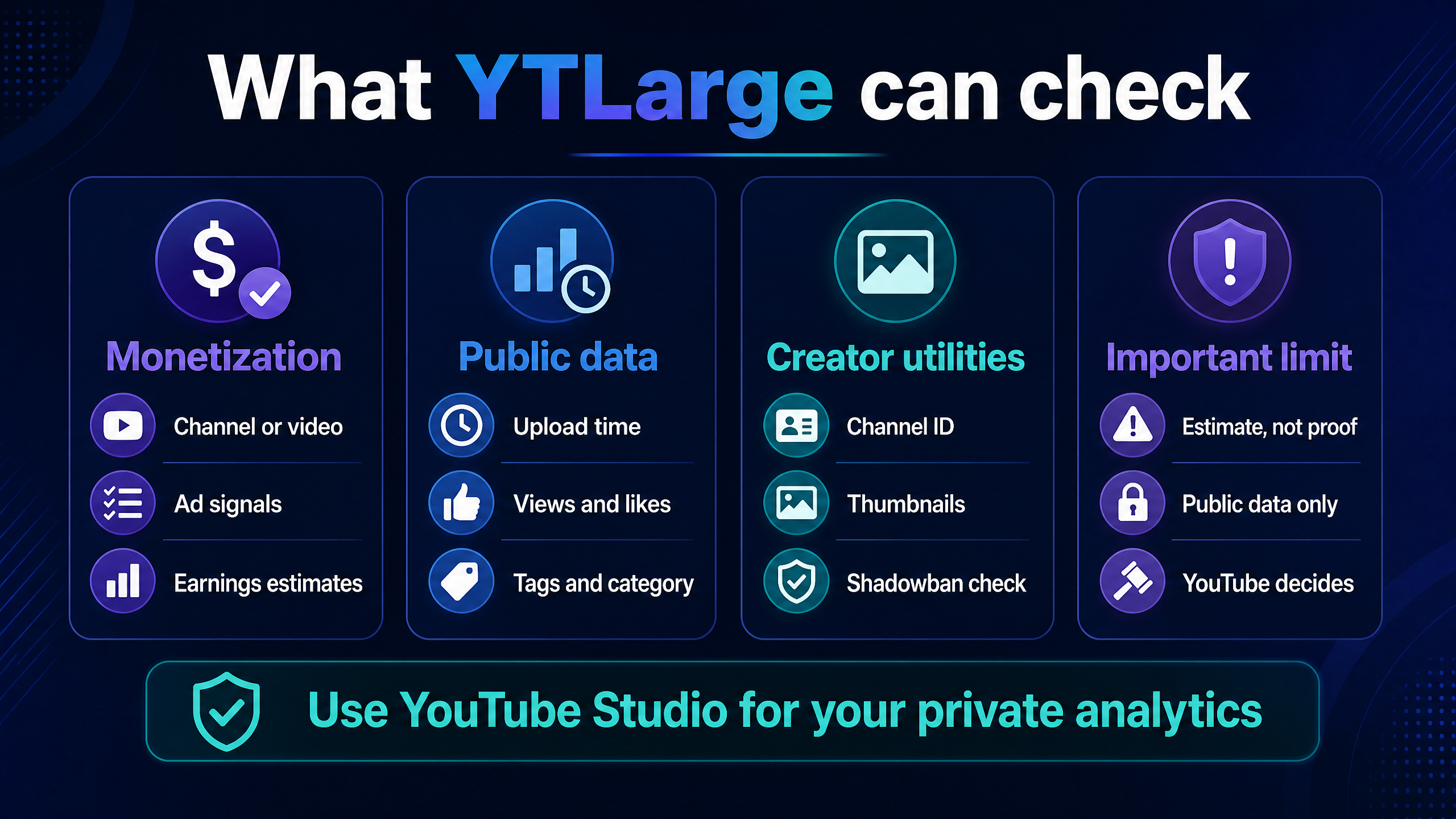
YTLarge can organize public signals, but YouTube Studio remains the source for private channel analytics.
Which YTLarge tools are most useful?
The toolkit’s value depends on whether you have a narrow question. A creator who wants one upload timestamp may finish in a minute. A creator expecting a complete channel strategy platform may find the pages more fragmented.
Tool | What it helps you inspect | Useful for | Main caution |
Monetization Checker | Monetization and advertising signals, channel or video details, and earning estimates | Competitor research and public channel inspection | It cannot prove YPP status or guarantee revenue |
Data Viewer | Upload dates, last modified data, views, likes, comments, tags, category, captions, and metadata | Video research and publishing-pattern checks | Public metadata does not reveal private performance |
Channel ID Finder | Channel and user identifiers | API workflows and channel records | An ID does not reveal private channel data |
Tag Extractor | Tags or keywords associated with a public video or channel | Metadata research | Tags have limited influence compared with viewer response and content relevance |
Money Calculator | Estimated earning ranges from views or channel/video inputs | Rough scenario planning | Estimates depend on assumptions and do not equal payouts |
Thumbnail Downloader | Public thumbnails and channel images | Packaging research and reference collection | Downloading an image does not grant reuse rights |
Shadowban Detector | A third-party signal about visibility or restriction | Troubleshooting questions | “Shadowban” is not a definitive YouTube diagnosis |
Image Tool | Profile pictures, channel banners, and thumbnails | Asset inspection | Respect copyright, trademarks, and creator permissions |
How does the YTLarge Monetization Checker work?
The official Monetization Checker page says you can enter a channel or video URL to inspect monetization status and potential earnings. The page also lists channel authenticity, ad status, ad counts, ad breaks, statistics, region restrictions, playlists, tags, channel creation information, and other public signals.
That is a large amount of information for a single lookup, but you should separate direct observation from inference. A displayed ad may come from YouTube’s own decisions, a video’s rights situation, or a viewer’s experience. It does not give you a complete view of the channel’s contractual monetization status.
YTLarge’s page makes this correction itself: it warns that non-monetized videos may still show ads, so ad presence alone does not prove monetization. That warning should appear in any serious interpretation of the tool.
Is YTLarge’s monetization checker accurate?
YTLarge’s FAQ says its checker uses YouTube API data and that YouTube makes the final monetization decision. The distinction matters. An API-informed tool may report signals or estimates, but only YouTube can approve a channel for YPP, enable modules, or finalize creator revenue.
Use the checker for competitor research, not as a legal or financial determination. If you own the channel, open YouTube Studio’s Earn section and Analytics. If you are evaluating another channel, label the result as “likely,” “observed,” or “estimated” rather than presenting it as confirmed.
What does YTLarge Data Viewer show?
The Data Viewer says it can retrieve public video and channel metadata, including exact published time, last modified information, video category, views, likes, dislikes, comments, language, duration, description, captions, tags, thumbnails, region restrictions, cards, end-screen information, and other details.
The upload-time feature can help you study publishing patterns, but it has an important distinction. The page explains that a video can have a published time and a later last-modified time, and that editing after publication can change the latter.
Do not turn a timestamp into a confident story about a creator’s schedule. Record the timestamp, compare several videos, and look for a repeated pattern before making a conclusion.
Can YTLarge extract YouTube tags?
The official FAQ says the Tag Extractor analyzes public video metadata to show tags used by a public video. That can help you document how a competitor labels content or identify related vocabulary for your own research.
Tags do not rescue an unclear video. Use them as a small metadata reference, then spend more time on the viewer’s problem, the title-thumbnail promise, the opening, and the usefulness of the video itself.
Does YTLarge download YouTube thumbnails?
Yes. The homepage and Data Viewer page advertise thumbnail and image tools for viewing or downloading public YouTube images.
Use the downloader for research, archiving your own assets, or checking how a channel’s packaging changes over time. Do not copy another creator’s thumbnail, banner, or profile image into your own channel without permission. A public download button does not transfer copyright or trademark rights.
Is YTLarge free?
YTLarge’s homepage describes its core toolkit, and its FAQ says most basic tools are free. The same FAQ mentions premium features for advanced analytics, historical tracking, saved searches, and custom reports.
The most accurate answer is mostly free for basic lookups, with possible premium features. The public pages reviewed do not provide a complete current pricing table, plan comparison, or clearly itemized limits for each tool.
Access question | What the public evidence supports | What you should verify before relying on it |
Are basic tools free? | The FAQ says most basic tools are free | Whether the specific tool has a request limit or account gate |
Can you use tools without an account? | The FAQ says basic tools can be used without an account | Whether the current page requests email, login, or consent |
Does YTLarge have premium features? | The FAQ says advanced analytics and detailed insights may be premium | Current plan names, price, trial, and cancellation terms |
Is there one all-access price? | No complete price table appeared in the reviewed public pages | Whether the pricing page has moved or requires login |
Are reports unlimited? | The public FAQ does not promise unlimited access | Daily, monthly, IP, or tool-specific limits |
A free tool can still carry a time cost. If you repeatedly copy URLs, export results, and reconcile estimates with YouTube Studio, a paid or first-party workflow may save more time even when YTLarge costs nothing.
What can YTLarge tell you about YouTube monetization?
YTLarge can organize visible signs related to ads, monetization, authenticity, channel statistics, and estimated earnings. Those signs can help you form a research hypothesis about a channel or video.
They cannot establish the complete YPP decision. YouTube’s own guidance explains that the Partner Program includes different earning features, each with its own requirements and modules. YouTube also says that turning on ads does not guarantee that ads will automatically appear because content goes through automated or human review.
That creates a useful three-level interpretation model:
Level | Example statement | Confidence |
Directly visible | “The video page displayed ads during my check.” | Limited observation |
Tool estimate | “YTLarge reports or infers a monetization signal.” | Requires method and date |
First-party decision | “YouTube Studio shows the channel has access to a monetization feature.” | Strongest for your own channel |
Use the first two levels to research public channels. Use YouTube Studio and YouTube’s current eligibility documentation for your own channel’s decision.
Are YTLarge earnings estimates reliable?
An earnings calculator can help you model a range, but it cannot know the channel’s exact RPM, geographic mix, ad inventory, viewer behavior, advertiser suitability, memberships, sponsorships, taxes, or final AdSense results.
Treat the number as a scenario, not income evidence. If a calculator assumes a particular RPM, the estimate follows that assumption. A simple model looks like this:
Estimated ad revenue = monetized views ÷ 1,000 × assumed RPM
For example, 100,000 monetized views at a hypothetical $4 RPM would produce an estimate of $400. That calculation says nothing about whether the channel earned that amount, because the input RPM may not match the creator’s actual audience or content.
YouTube Analytics provides revenue reports for eligible channels, while YTLarge’s public calculator provides an external estimate. Keep those outputs in separate columns when you build a research sheet.
Can YTLarge replace YouTube Analytics?
No. YouTube’s official Analytics documentation describes private reports for overview, content, reach, engagement, audience, revenue, and trends. It also says Advanced Mode can help creators compare performance and export data.
YTLarge can complement that data by looking at public channels or by surfacing metadata you want to record. It cannot replace the first-party reports that show your impressions, click-through rate, watch time, average view duration, audience composition, revenue, and returning-viewer information.
The practical boundary is straightforward:
•Use YTLarge to ask, “What can I observe about this public channel or video?”
•Use YouTube Studio to ask, “What happened inside my channel, and did my change improve performance?”
That distinction prevents one of the most common third-party analytics mistakes: treating a public estimate as if it were private measurement.
Is YTLarge safe to use?
For basic URL lookups, the main safety questions concern the data you submit, the permissions a page requests, downloads, and the accuracy of the result. YTLarge’s FAQ says basic tools can work without an account and says it collects necessary data without sharing personal information with third parties.
Those statements come from YTLarge. They are not an independent security certification. Before using an account or premium feature, read the current privacy policy, check the exact domain, review requested permissions, and avoid entering your Google password into a third-party form.
Treat downloaded files with care. A thumbnail or image may carry someone else’s copyright, and a downloaded asset may contain metadata you do not need. Store only what you need and delete files that do not support a clear research purpose.
Does YTLarge access private YouTube data?
The public URL-based workflows described on the Monetization Checker and Data Viewer pages focus on channel and video URLs. The FAQ says basic tools can work without an account, while account features may include saved searches and historical tracking.
That supports a cautious conclusion: basic lookups appear designed around publicly available information, but you should inspect the current consent screen for any account-based or premium feature. Never assume that a “YouTube tool” can access private Studio data without an explicit authorized connection.
What are YTLarge’s main limitations?
The first limitation is incomplete pricing clarity. The FAQ mentions free basics and premium features, but the reviewed public pages do not provide a complete price sheet or a feature-by-feature plan table.
The second limitation is methodology opacity. YTLarge says its monetization checker uses API data, but a reader still needs to know which signals drive each conclusion, when the data was collected, and how the tool handles missing or contradictory fields.
The third limitation is public-data dependence. Private videos, unlisted content, restricted channels, API limitations, and deleted pages can prevent access or produce incomplete output. YTLarge’s FAQ acknowledges these causes.
The fourth limitation is false precision. Exact timestamps, view counts, estimated earnings, and status labels can look authoritative even when a creator’s interpretation exceeds what the data proves.
The fifth limitation is the “shadowban” label. Visibility problems can come from audience mismatch, weak packaging, search competition, policy restrictions, indexing changes, or ordinary performance variation. A third-party detector can suggest a question, but it cannot provide a definitive platform diagnosis.
YTLarge pros and cons
What does YTLarge do well?
YTLarge puts many small YouTube research tasks in one browser directory. A beginner can move from a channel ID lookup to a data view, thumbnail check, tag inspection, or monetization estimate without learning several separate interfaces.
The URL-first workflow reduces setup for public research. You can inspect a competitor’s public video, record its metadata, and return to your production workflow without connecting your own channel.
The toolkit also addresses practical research questions that broader creator suites may not prioritize, such as exact upload time, banner downloads, channel identifiers, and public metadata extraction.
Where does YTLarge fall short?
YTLarge does not provide enough public evidence to treat its estimates as definitive. The official FAQ itself tells readers that YouTube makes the final monetization decision.
The product also lacks a clearly documented, unified pricing model in the public pages reviewed. That makes it difficult to compare the cost of premium features or know which limits apply to a particular workflow.
Finally, tool breadth can encourage shallow analysis. If you collect tags, views, and estimated earnings without watching the videos, reading comments, or checking your own Analytics, you may gather more numbers without improving your next upload.
What are the best YTLarge alternatives?
YouTube Studio is the strongest alternative for private performance data because it shows first-party channel and video reports. YouTube’s Analytics documentation covers reach, engagement, audience, revenue, and trends, while Advanced Mode supports comparison and export.
Google Trends and YouTube autocomplete can help with broad topic research. YT Crew’s free creator tools can cover related tasks such as keyword research, title development, tag generation, thumbnail planning, and analytics support without adding another paid subscription.
A specialized YouTube suite may make more sense when you need a unified workflow. vidIQ and TubeBuddy focus on broader creator SEO, optimization, and publishing features. OutlierKit and 1of10 focus more on content and outlier research. The right alternative depends on whether you need private measurement, public research, packaging, or topic discovery.
Your goal | Start with | Reason |
Measure your own channel | YouTube Studio | First-party data and creator controls |
Check a public video’s metadata | YTLarge Data Viewer | Fast URL-based lookup |
Research public monetization signals | YTLarge Monetization Checker | Combines visible signals and estimates, with caution |
Plan titles and topics | YT Crew, Google Trends, or YouTube autocomplete | Low-cost idea and phrase research |
Run a broader creator SEO workflow | vidIQ or TubeBuddy | More unified suite-style features |
Find content patterns and outliers | OutlierKit or 1of10 | Research-focused workflows |
Who should use YTLarge?
YTLarge suits beginner creators who want quick public lookups without paying for a full analytics suite. It also suits freelancers, researchers, and channel strategists who need to record visible metadata from several public videos.
It is useful for competitor research when you label the result correctly. Record the URL, date, tool used, output, and your interpretation. That small audit trail helps you distinguish a repeated pattern from a one-time result.
YTLarge is less suitable when you need private audience reports, audited revenue data, a complete content strategy system, or a transparent premium plan with published limits. You should also look elsewhere if a tool’s output needs to support a legal, financial, or platform-enforcement decision.
Is YTLarge worth using?
YTLarge is worth trying for narrow public-data tasks because the basic toolkit is presented as free and covers several useful lookups. Start with the Data Viewer or Channel ID Finder, then test whether the result saves time compared with checking the public YouTube page manually.
The Monetization Checker and Money Calculator deserve more caution. Use them to form research hypotheses or compare rough scenarios, not to confirm YPP status or predict a creator’s actual income.
YTLarge becomes less compelling if you need a connected analytics dashboard, reliable historical tracking, transparent premium pricing, or a complete workflow from idea to measurement. In that case, combine YouTube Studio with a focused creator tool instead of treating YTLarge as an all-purpose replacement.
How should you test YTLarge?
Choose one public video and record its visible view count, like count, title, category, upload date, thumbnail, and description. Run the same URL through YTLarge Data Viewer and Monetization Checker, then compare the outputs with the public video page.
Repeat the test on two more videos from different channels. Note missing fields, conflicting timestamps, estimated values, and labels that require interpretation. If the tool gives you a useful answer faster than your current process, keep it for that task.
Do not connect your own channel or buy a premium feature until you understand the requested data, the current limits, the cancellation terms, and the difference between a public estimate and first-party Analytics.
FAQ: YTLarge questions creators search for
What is YTLarge?
YTLarge is a browser-based YouTube toolkit with public research utilities for monetization signals, video metadata, channel IDs, tags, thumbnails, shadowban checks, and earnings estimates.
Is YTLarge free?
YTLarge’s FAQ says most basic tools are free, while advanced analytics and detailed insights may be premium. Check the individual tool and current pricing page before assuming unlimited access.
Is YTLarge safe?
Use the official domain, review the current privacy and consent information, avoid sharing your Google password, and grant only permissions you understand. YTLarge’s safety and data-handling statements come from its own FAQ and policies, not an independent security audit.
Does YTLarge require a login?
The FAQ says basic tools can be used without an account, while accounts may provide saved searches, historical tracking, premium features, and custom reports. The exact requirement can vary by tool, so check the current page before submitting information.
Can YTLarge check whether a YouTube channel is monetized?
YTLarge’s Monetization Checker reports monetization and advertising signals for a channel or video. The result is not definitive proof of YPP approval, and ads alone do not prove that a channel or video is monetized.
Is the YTLarge monetization checker accurate?
YTLarge says the checker uses YouTube API data and reminds readers that YouTube makes the final monetization decision. Use the result as a public estimate or research signal, not as confirmation.
Can YTLarge show private YouTube Analytics?
No public page reviewed establishes that basic YTLarge tools replace private YouTube Studio reports. YouTube Studio remains the source for private reach, engagement, audience, revenue, and trends data.
What does YTLarge Data Viewer do?
The Data Viewer retrieves public video and channel metadata, including upload and modification information, views, likes, comments, category, duration, captions, tags, thumbnails, and other fields.
Can YTLarge find the exact YouTube upload time?
YTLarge says its Data Viewer can show the published date and time and related last-modified information. Treat the result carefully because an edit can change last-modified data and because upload, processing, and publication events are not identical.
Does YTLarge extract YouTube tags?
Yes. The official FAQ says its Tag Extractor analyzes public video metadata to show tags. Use the output as a small research clue, not as a substitute for a relevant topic, clear packaging, and useful content.
Does YTLarge download YouTube thumbnails?
Yes. Its homepage and Data Viewer page list image and thumbnail download functions. Downloading a public image does not give you permission to reuse another creator’s artwork.
Are YTLarge earnings estimates accurate?
They are estimates based on assumptions about views, monetized views, and RPM. They cannot reveal a creator’s actual revenue, sponsorships, taxes, audience mix, or AdSense results.
What is the best YTLarge alternative?
Use YouTube Studio for your own private analytics, Google Trends and autocomplete for broad topic research, YT Crew for free creator utilities, and a specialized suite such as vidIQ or TubeBuddy when you need broader optimization features.
Conclusion: is YTLarge worth using?
YTLarge is worth testing when you need a free public YouTube lookup, such as a channel ID, video timestamp, tag list, thumbnail, metadata record, or rough monetization signal. Its breadth makes it convenient, but the toolkit does not replace YouTube Studio, confirm YPP decisions, or turn estimated earnings into verified income.
Start with one public video, save the input and output, and compare the result with the source page. Your next step is to run that test, then use YT Crew’s free YouTube creator tools to check the title, topic, thumbnail, or SEO decision you make from the data.